Categories
Hardware Linux

Firefox/LibreWolf taking down graphics stack on Wayland with AMD GPU

I keep having screens freezing seemingly randomly on my AMD Strix Halo GPU on Wayland whenever (and it seems only if!) I’m using Firefox/LibreWolf.

I can recover fine: Unplug the HDMI or DisplayPort cable of the affected screen, wait a few seconds and the graphics stack resets and everything is back to normal.

When this happens, I get the following module panic retrievable via dmesg:

[69348.590903] amdgpu 0000:c4:00.0: [drm] ERROR [CRTC:86:crtc-0] flip_done timed out
[69362.413939] amdgpu 0000:c4:00.0: [drm] ERROR flip_done timed out
[69362.413954] amdgpu 0000:c4:00.0: [drm] ERROR [CRTC:86:crtc-0] commit wait timed out
[69372.653095] amdgpu 0000:c4:00.0: [drm] ERROR flip_done timed out
[69372.653111] amdgpu 0000:c4:00.0: [drm] ERROR [PLANE:83:plane-7] commit wait timed out
[69843.658648] amdgpu 0000:c4:00.0: [drm] ERROR [CRTC:86:crtc-0] flip_done timed out
[69845.208181] workqueue: dm_irq_work_func [amdgpu] hogged CPU for >10000us 4 times, consider switching to WQ_UNBOUND
[69853.896845] amdgpu 0000:c4:00.0: amdgpu: [drm] ERROR [CRTC:86:crtc-0] hw_done or flip_done timed out
[69864.136149] amdgpu 0000:c4:00.0: [drm] ERROR flip_done timed out
[69864.136165] amdgpu 0000:c4:00.0: [drm] ERROR [CRTC:86:crtc-0] commit wait timed out
[69874.375292] amdgpu 0000:c4:00.0: [drm] ERROR flip_done timed out
[69874.375309] amdgpu 0000:c4:00.0: [drm] ERROR [PLANE:83:plane-7] commit wait timed out
[69874.456995] ------------[ cut here ]------------
[69874.456998] WARNING: CPU: 28 PID: 411 at drivers/gpu/drm/amd/amdgpu/../display/amdgpu_dm/amdgpu_dm.c:9074 amdgpu_dm_commit_planes+0x10c3/0x1620 [amdgpu]
[69874.457496] Modules linked in: tls snd_seq_dummy snd_hrtimer xfrm_interface xfrm6_tunnel tunnel4 tunnel6 xfrm_user xfrm_algo rpcsec_gss_krb5 twofish_generic twofish_avx_x86_64 twofish_x86_64_3way twofish_x86_64 twofish_common serpent_avx2 serpent_avx_x86_64 serpent_sse2_x86_64 serpent_generic blowfish_generic blowfish_x86_64 blowfish_common cast5_avx_x86_64 cast5_generic cast_common nft_masq des3_ede_x86_64 nfsv4 des_generic libdes camellia_generic camellia_aesni_avx2 camellia_aesni_avx_x86_64 camellia_x86_64 nft_chain_nat nf_nat xcbc nf_conntrack nf_defrag_ipv6 nf_defrag_ipv4 md4 nfs netfs bridge stp llc vxlan nf_tables ip6_udp_tunnel udp_tunnel ccm overlay qrtr rfcomm cmac algif_hash algif_skcipher af_alg bnep binfmt_misc zfs(PO) spl(O) nfsd nfs_acl sch_fq_codel lockd grace msr parport_pc ppdev lp parport joydev btusb btrtl btintel btbcm btmtk bluetooth wacom input_leds amd_atl intel_rapl_msr intel_rapl_common snd_acp70 snd_acp_i2s snd_acp_pdm snd_acp_pcm snd_sof_amd_acp70 snd_sof_amd_acp63 snd_sof_amd_vangogh
[69874.457550] snd_sof_amd_rembrandt snd_sof_amd_renoir snd_hda_codec_alc662 snd_sof_amd_acp snd_hda_codec_realtek_lib snd_sof_pci snd_hda_codec_generic snd_sof_xtensa_dsp snd_sof snd_sof_utils snd_hda_codec_atihdmi snd_pci_ps snd_hda_codec_hdmi snd_soc_acpi_amd_match snd_amd_sdw_acpi soundwire_amd soundwire_generic_allocation soundwire_bus edac_mce_amd snd_soc_sdca mt7925e snd_hda_intel mt7925_common snd_hda_codec snd_soc_core snd_usb_audio mt792x_lib snd_hda_core snd_compress mt76_connac_lib snd_intel_dspcfg ac97_bus mt76 snd_pcm_dmaengine snd_usbmidi_lib snd_intel_sdw_acpi kvm_amd snd_ump snd_hwdep snd_rpl_pci_acp6x snd_seq_midi snd_acp_pci mac80211 snd_seq_midi_event snd_amd_acpi_mach snd_acp_legacy_common kvm nls_iso8859_1 uvcvideo snd_rawmidi snd_pci_acp6x videobuf2_vmalloc snd_pcm uvc snd_seq videobuf2_memops videobuf2_v4l2 snd_seq_device irqbypass videobuf2_common snd_timer polyval_clmulni snd_pci_acp5x cfg80211 ghash_clmulni_intel videodev snd_rn_pci_acp3x snd snd_acp_config aesni_intel i2c_piix4 snd_soc_acpi
[69874.457591] mc rapl wmi_bmof libarc4 ccp amdxdna soundcore snd_pci_acp3x k10temp i2c_smbus soc_button_array amd_pmc mac_hid amdgpu amdxcp drm_panel_backlight_quirks gpu_sched drm_buddy drm_ttm_helper ttm drm_exec drm_suballoc_helper drm_display_helper auth_rpcgss cec rc_core i2c_algo_bit nvme_fabrics sunrpc efi_pstore nfnetlink dmi_sysfs ip_tables x_tables autofs4 btrfs blake2b_generic raid10 raid456 async_raid6_recov async_memcpy async_pq async_xor async_tx xor raid6_pq raid1 raid0 linear hid_generic usbhid sdhci_pci nvme sdhci_uhs2 psmouse thunderbolt nvme_core serio_raw sdhci nvme_keyring video i2c_hid_acpi cqhci nvme_auth i2c_hid wmi hid
[69874.457638] CPU: 28 UID: 0 PID: 411 Comm: kworker/28:1H Kdump: loaded Tainted: P O 6.17.0-14-generic #14-Ubuntu PREEMPT(voluntary)
[69874.457644] Tainted: [P]=PROPRIETARY_MODULE, [O]=OOT_MODULE
[69874.457645] Hardware name: AZW GTR Pro/GTR Pro, BIOS GTRP108 09/16/2025
[69874.457648] Workqueue: events_highpri dm_irq_work_func [amdgpu]
[69874.458008] RIP: 0010:amdgpu_dm_commit_planes+0x10c3/0x1620 [amdgpu]
[69874.458309] Code: e8 f2 5a ff ff 4c 8b 9d 78 ff ff ff e9 c2 f9 ff ff 31 c9 48 85 d2 0f 85 cb fe ff ff e9 bf f8 ff ff 0f 0b 0f 0b e9 f7 fe ff ff <0f> 0b e9 0f ff ff ff 48 8b 45 88 be 01 00 00 00 4c 89 9d 30 ff ff
[69874.458311] RSP: 0018:ffffd10e41b3f9e8 EFLAGS: 00010082
[69874.458315] RAX: 0000000000000001 RBX: 0000000000000246 RCX: 0000000000000000
[69874.458317] RDX: 0000000000000000 RSI: 0000000000000000 RDI: 0000000000000000
[69874.458318] RBP: ffffd10e41b3fae8 R08: 0000000000000000 R09: 0000000000000000
[69874.458319] R10: 0000000000000000 R11: 0000000000000000 R12: ffff8d5aa6f45b18
[69874.458320] R13: 0000000000000000 R14: ffff8d5aa8dcc000 R15: ffff8d5a8d682c00
[69874.458322] FS: 0000000000000000(0000) GS:ffff8d718b87f000(0000) knlGS:0000000000000000
[69874.458324] CS: 0010 DS: 0000 ES: 0000 CR0: 0000000080050033
[69874.458325] CR2: 00007ef8da7208f0 CR3: 00000015d0c40000 CR4: 0000000000f50ef0
[69874.458327] PKRU: 55555554
[69874.458329] Call Trace:
[69874.458331] [69874.458337] ? manage_dm_interrupts+0xa3/0x210 [amdgpu] [69874.458606] amdgpu_dm_atomic_commit_tail+0xa77/0x1130 [amdgpu] [69874.458862] commit_tail+0xc0/0x1b0 [69874.458868] ? drm_atomic_helper_swap_state+0x2d2/0x3a0 [69874.458872] drm_atomic_helper_commit+0x153/0x190 [69874.458874] drm_atomic_commit+0xaa/0xf0 [69874.458877] ? __pfx___drm_printfn_info+0x10/0x10 [69874.458883] dm_restore_drm_connector_state+0x102/0x170 [amdgpu] [69874.459125] handle_hpd_irq_helper+0x1a3/0x1e0 [amdgpu] [69874.459360] handle_hpd_irq+0xe/0x20 [amdgpu] [69874.459592] dm_irq_work_func+0x16/0x30 [amdgpu] [69874.459824] process_one_work+0x18b/0x370 [69874.459830] worker_thread+0x317/0x450 [69874.459833] ? _raw_spin_lock_irqsave+0xe/0x20 [69874.459839] ? __pfx_worker_thread+0x10/0x10 [69874.459842] kthread+0x108/0x220 [69874.459845] ? __pfx_kthread+0x10/0x10 [69874.459848] ret_from_fork+0x131/0x150 [69874.459853] ? __pfx_kthread+0x10/0x10 [69874.459855] ret_from_fork_asm+0x1a/0x30 [69874.459860]
[69874.459861] ---[ end trace 0000000000000000 ]---
[69874.498959] workqueue: dm_irq_work_func [amdgpu] hogged CPU for >10000us 5 times, consider switching to WQ_UNBOUND
[69874.722942] workqueue: dm_irq_work_func [amdgpu] hogged CPU for >10000us 7 times, consider switching to WQ_UNBOUND
[69874.841943] workqueue: dm_irq_work_func [amdgpu] hogged CPU for >10000us 11 times, consider switching to WQ_UNBOUND

It’s super annoying but not the end of the world. I would like to debug it, however, to find out who’s going to get the issue posted: Firefox, LibreWolf, Wayland or AMD?

Any ideas? Let me know @cweickhmann@qoto.org.

Categories
Linux Python

Massive Nextcloud log file quickly analysed using Python

I ran into a problem with quite a buggy Nextcloud instance on a host with limited quota. The Nextcloud log file would baloon at a crazy rate. So at one point, I snatched a 700 MB sample (yeah, that took maybe an hour or so) and wondered: what’s wrong?

So, first things first: Nextcloud’s log files are JSON files. Which makes them excruciatingly difficult to read. Okay, better than binary, but still, not an eye pleaser. They wouldn’t be easy to grep either. So, Python to the rescue as it has the json module*.

First, using head I looked at the first 10 lines only. Why? Because I had no idea of the performance of this little script of mine and I wanted to check it out first.

head -n 10 nextcloud.log > nextcloud.log.10

Because these logs are scattered with user and directory names and specifics of that particular Nextcloud instance (it’ll be NC from here on), I won’t share any of them here. Sorry. But if you have NC yourself, just get it from the /data/ directory of your NC instance.

I found each line to contain one JSON object (enclosed in curly brackets). So, let’s read this line-by-line and feed it into Python’s JSON parser:

import json

with open("nextcloud.log.10", "r") as fh:
    for line in fh:
        data = json.loads(line)

At this point, you can already get an idea of how long each line is processed. If you’re using Jupyter Notebook, you can place the with statement into its own cell and simply use the %%timeit cell magic for a good first impression. On my machine it says

592 µs ± 7.65 µs per loop (mean ± std. dev. of 7 runs, 1,000 loops each)

which is okay: roughly 60 µs per line.

Next, I wanted to inspect a few lines and make reading easier: pretty print, or pprint as its module is called, to the rescue!

from pprint import pprint

pprint(data)

This pretty prints the last line. If you want to access all 10 lines, create for instance an empty array data_lines first and do data_lines.append(data) inside the for loop.

{'reqId': '<redacted>',
 'level': 2,
 'time': '2025-02-06<redacted>',
 'remoteAddr': '<redacted>',
 'user': '<redacted>',
 'app': 'no app in context',
 'method': 'GET',
 'url': '/<redacted>/apps/user_status/api/<redacted>?format=json',
 'message': 'Temporary directory /www/htdocs/<redacted>/tmp/ is not present or writable',
 'userAgent': 'Mozilla/5.0 (Linux) <redacted> (Nextcloud, <redacted>)',
 'version': '<redacted>',
 'data': []}

Okay, there is a message which might be interesting, but I found another one:

{'reqId': '',
'level': 0,
'time': '2025-02-06T',
'remoteAddr': '',
'user': '',
'app': 'no app in context',
'method': 'PROPFIND',
'url': '//',
'message': 'Calling without parameters is deprecated and will throw soon.',
'userAgent': 'Mozilla/5.0 (Linux) (Nextcloud, 4)',
'version': '',
'exception': {'Exception': 'Exception',
   'Message': 'No parameters in call to ',
    …

Now, this is much more interesting: It contains a key exception with a message and a long traceback below.

I simply want to know:

  • How many of these exceptions are there?
  • How many unique messages are there?

In other words: Is this a clusterfuck, or can I get this thing silent by fixing a handful of things?

So, the idea is simple:

  1. Read each line.
  2. Check if the line contains an exception keyword.
  3. In that case, count it and…
  4. … append the corresponding message to a list.
  5. Finally, convert that list into a set.

And here is how this looks in Python:

import json
from pprint import pprint

lines = 0
exceptions = 0
ex_messages = []

with open("nextcloud.log", "r") as fh:
    for line in fh:
        lines += 1
        data = json.loads(line)
        
        if "exception" in data.keys():
            exceptions += 1
            msg = data["exception"]["Message"]
            ex_messages.append(msg)

print(f"{lines:d} read, {exceptions:d} exceptions.")

s_ex_msg = set(ex_messages)
print(f"{len(s_ex_msg):d} unique message types.")

pprint(s_ex_msg)

I had

37460 read, 32537 exceptions.
22 unique message types.

That’s a lot of exceptions but a surprisingly small number of unique messages, i.e. possible individual causes.

In my case, it mainly showed me what I knew beforehand: The database was a total mess.

But see what you find.

Exercise: See how you need to modify the script to count how many out of the 32537 exceptions correspond to each of the 22 unique messages. And toot about it.

*) I wonder if people will come and propose to use simplejson, as I’ve read in the wild, because “it’s faster!!!”. Use %%timeit to find out. Anything else is Mumpitz (forum voodoo).

Categories
Hardware Linux

Working on LDD3’s tiny tty example

A while back I started tipping my toes into Linux Kernel module development. Mainly, to understand a driver for a data capture card I got to work with (or for, I believe).

Well, there is a go-to reference: the book Linux Device Drivers, 3rd Edition by Corbet, Rubini and Kroah-Hartman (from now on LDD3).

It’s great, it explains a lot and contains lots of hands-on example code, too. But, unfortunately it refers to the 2.6 Linux kernel. We’re at 6.8 at the time of writing this. So it’s a bit outdated.

No worries though, FOSS is a beautiful beast, and people have taken the example modules and updated them. Around version 5.15 that is. And things have changed again – at least for tty it seems.

There is a pull request to make it 6.x compatible, but … it’s almost a year old by now, and it seems incomplete. Yet, it was a really great thing to come across at the start of this journey, because it restored my sanity.

So, here’s my go at the tiny tty example driver and I hope I can finish it up into something that works with a 6.x Linux kernel.

Things have changed

Using static major/minor numbers is discouraged, or at least, made easier to avoid in more recent kernel versions (feels like since 4.x or so). So, some functions used in LDD3’s examples simply don’t exist anymore.

alloc_tty_driver is now superseeded by tty_alloc_driver (okay, that re-naming is kind of evil). And while the former only bothered about the number of supported ports, the latter wants flags, too. So, it looks like the returned struct of type tty_driver already contains a lot of entries when tty_alloc_driver is done with it.

I’ve refrained from using the TTY_DRIVER_NO_DEVFS flag, because I think dynamic stuff is always nice, so TTY_DRIVER_DYNAMIC_DEV it is.

tty_driver->owner is not supposed to be set anymore, according to this old’ish LKLM post. Same goes for ->major (see tty_alloc_driver).

The module is not put down anymore by put_tty_driver but by tty_driver_kref_put which seemingly also handles references in proc (I’ve run into issues that the proc entry was not removed after rmmoding the module and hence, on the next try insmod was complaining).

I mention this, because LDD3’s static void __exit tiny_exit(void) spends two thirds of its code to close ports and kfree associated memory. This code is still present in the pull request with the updated example from 2023.

Still, I have to investigate if tty_driver_kref_put also removes timers.

Things have gotten easier

Compared to the example for a 2.6 kernel in LDD3, the current version (at least for module __init and __exit) is way easier and frankly cleaner, i.e. easier to read.

Still, or maybe exactly because of that, I think it’s time for a fourth edition of Linux Device Drivers.

I try to go through with the rest of the module and understand and ideally fix it. Then I’ll upload it too, for later generations at kernel 8.x to despair of it. Link soon.

Categories
Uncategorized

Using Sympy’s Common Subexpression Elimination to generate Code

A nifty feature of sympy is its code generator. This allows generating code in many languages from expressions derived in sympy. I’ve been using this for a while and came across the Common Subexpression Elimination (CSE) function (again), recently.

In earlier* versions of sympy I did not find it of great use. But now I was pleasantly surprised how much it matured. (* I cannot say for sure when I last tried using it; it must’ve been a long while ago.)

What is it and what is it good for?

Let’s say we want to generate code for a PI controller in C. The literature says its transfer function (in DIN notation) reads:

 G(s) = K_p + \frac{K_i}{s}

Then furthermore the representation for a discrete time system with time step T_s becomes

 G(z) = K_p + \frac{K_i T_s}{2} + \frac{\frac{K_i T_s}{2} - K_p}{z}

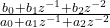
In order to efficiently and flexibly calculate the response we want to implement it in a second order IIR (infinite impulse response) filter structure. This structure is basically a representation of  G_z as a rational function

 \frac{ b_0 + b_1 z^{-1} + b_2 z^{-2} }{ a_0 + a_1 z^{-1} + a_2 z^{-2} }

so we need to take the expression apart such that we can determine the coefficients a_1, a_2, b_0, … (by convention, the problem is scaled such that a_0 = 1.

This is all very cumbersome to do manually (and I suck at doing this, especially as I insert quite embarrassing mistakes all the time). So, sympy to the rescue:

import sympy as sy

Kp, Ki, Ts = sy.symbols("K_p K_i T_s", real=True)
z = sy.symbols("z", complex=True)
G_z = Kp + Ki*Ts/2 + (Ki*Ts/2 - Kp)/z

display(G_z)

n, d = G_z.ratsimp().as_numer_denom()
n, d = n.as_poly(z), d.as_poly(z)

display(n, d)

We first define the symbols needed. Then set up G_z according to our equation above. After displaying it for good measure, we do a rational simplification ratsimp() on it and split it into numerator n and denominator d.

Now, we represent n and d as polynomials of z. And this is how we obtain our coefficients a1, a2, and so on. We continue:

scale = d.LC()

n, d = (n.as_expr()/scale).as_poly(z), (d.as_expr()/scale).as_poly(z)
N, D = n.degree(), d.degree()

We find the scaling factor as the leading coefficient (LC()) of the denominator d, scale both accordingly and determine the degree of each (this is mostly to determine for how many terms we have to iterate when printing etc.).

Bs = n.all_coeffs()
As = d.all_coeffs()

display(Bs)
display(As)

Now, basically Bs contains all coefficients [b0 b1] and likewise for As. Here’s a shortcut, see if you can spot it.

And now comes the cse magic:

commons, exprs = sy.cse(Bs)

This returns a tuple. The first element is a list of tuples of arbitrarily assigned place holder variables x0, x1, and so on. The second element are the original expressions, but the placeholders are substituted. In this example:

(
  [
    (x0, K_i*T_s/2)
  ],
  [K_p + x0, -K_p + x0]
)

Which means, instead of calculating K_i*T_s/2 twice, we can do it once, assign it to x0 and use that on the expressions.

You can even concatenate As and Bs for good measure (not really necessary here, since the As only contain 1 and 0, but in other controller topologies this may change).

commons, exprs = sy.cse(As + Bs)

# Printing C code for instance
for com in commons:
    print( sy.ccode(com[1], assign_to=repr(com[0])) )

for expr, name in zip(exprs, "a0 a1 b0 b1".split(" ")):
    print( sy.ccode(expr, assign_to=f"coeffs.{name:s}") )

We obtain the common terms commons and the reduced expressions exprs, then print the common terms assigning them to their respective placeholder variables, and finally print the reduced expressions. This produces this five liner in C:

x0 = (1.0/2.0)*K_i*T_s;
coeffs.a0 = 1;
coeffs.a1 = 0;
coeffs.b0 = K_p + x0;
coeffs.b1 = -K_p + x0;

Now, how is this useful you ask? Well, for this toy example it certainly is a lot of work for five lines I could’ve just typed out.

But if you go into a PID controller with damped differential term, and you want your code to be efficient (i.e. have as few operations as possible), this is very handy. Just by changing the symbols and the expression for G_z we obtain this:

x0 = 2*T_v;
x1 = 1.0/(T_s + x0);
x2 = 4*T_v;
x3 = T_i*T_s;
x4 = 2*x3;
x5 = T_i*x2;
x6 = 1.0/(x4 + x5);
x7 = K_p*x4;
x8 = K_p*T_s*x0;
x9 = pow(T_s, 2);
x10 = 4*K_p*T_d*T_i + K_p*x5;
x11 = K_p*x9 + x10;
c.a0 = 1;
c.a1 = -x1*x2;
c.a2 = x1*(-T_s + 2*T_v);
c.b0 = x6*(x11 + x7 + x8);
c.b1 = (K_p*x9 - x10)/(T_i*x0 + x3);
c.b2 = x6*(x11 - x7 - x8);

I did this manually once, and only obtained five or six of the placeholders. That’s the power of cse().

Oh, you need the code in Python for testing? No problem, just use pycode instead (and work around that assign_to parameter).

So, there you have it.

Categories
Embedded Engineering Linux Python

Red Pitaya using only pyVISA

The Red Pitaya boards offer an SCPI server over an TCP/IP Socket connection. The makers describe how to use it. But instead of using plain pyVISA, they provide their own SCPI class.

That’s fine, because that class also provides handy functions to set the various in-built applications (signal generator and the likes).

But it is unnecessary complicated for a blinky example. And in my case, where I only needed some scriptable DIOs, it was quite cumbersome.

So, here is the blinky re-written in plain pyVISA:

import pyvisa as visa
from time import sleep

rm = visa.ResourceManager()
rp = rm.open_resource("TCPIP::169.254.XXX.XXX::5000::SOCKET",
                 read_termination="\r\n",
                 write_termination="\r\n"
                 )

print(rp.query("*IDN?"))

while True:
    rp.write("DIG:PIN LED0,1")
    sleep(.5)
    rp.write("DIG:PIN LED0,0")
    sleep(.5)

The magic lies in the read and write terminations. They have to be set to '\r\n'(in that order), or else the communication simply won’t work and time out.

Make sure you install a reasonably recent pyVISA and pyVISA-py (from pip) or libvisa (from your distro’s repository) before you start. For me (Ubuntu) this works as follows:

pip install -U pyvisa pyvisa-py
sudo apt install libvisa

This integrates nicely with existing instrument command structures and allows for quick testing.

Categories
Arduino Embedded Hardware

Arduino* and a custom board

At work a colleague developed a custom board in the time of chip shortage™ and had to use a 20 MHz oscillator in place of a 16 MHz requiring a custom board configuration. The solution after searching the often misleading Arduino forums was to hack it into the global platform.txt.

This is neither portable nor does it interact well with updates of the Core. Fortunately, there are very good, not misleading forum posts!

A (hopefully more than just slightly) better solution is to use the hardware/ directory in the Sketchbook folder and to reference the standard Arduino configurations (using the VENDOR_ID:VARIANT_ID notation).

  • Let’s name the board gsino since my colleague and I work at GSI.
  • Then let’s create a folder structure $SKETCHBOOK/hardware/gsi/avr and …
  • … write a basic boards.txt shown below:
gsino.name=GSino Board

gsino.upload.tool=arduino:avrdude
gsino.upload.protocol=arduino:arduino
gsino.upload.maximum_size=32256
gsino.upload.maximum_data_size=2048
gsino.upload.speed=144000

gsino.bootloader.tool=arduino:avrdude

gsino.build.mcu=atmega328p
gsino.build.f_cpu=20000000L
gsino.build.board=AVR_UNO
gsino.build.core=arduino:arduino
gsino.build.variant=arduino:standard

If the created folder contains only this board.txt file, the menu entry in the IDE for this board will be “Tools/Board/gsi-avr/GSino Board”. If you want it a little prettier, create a platform.txt with

gsino.name=GSino
gsino.version=1.0.0

Voilà! If you need to take this to another computer or share it with a friend, just zip the relevant parts of the $SKETCHBOOK/hardware/ folder and unpack it in its new location.

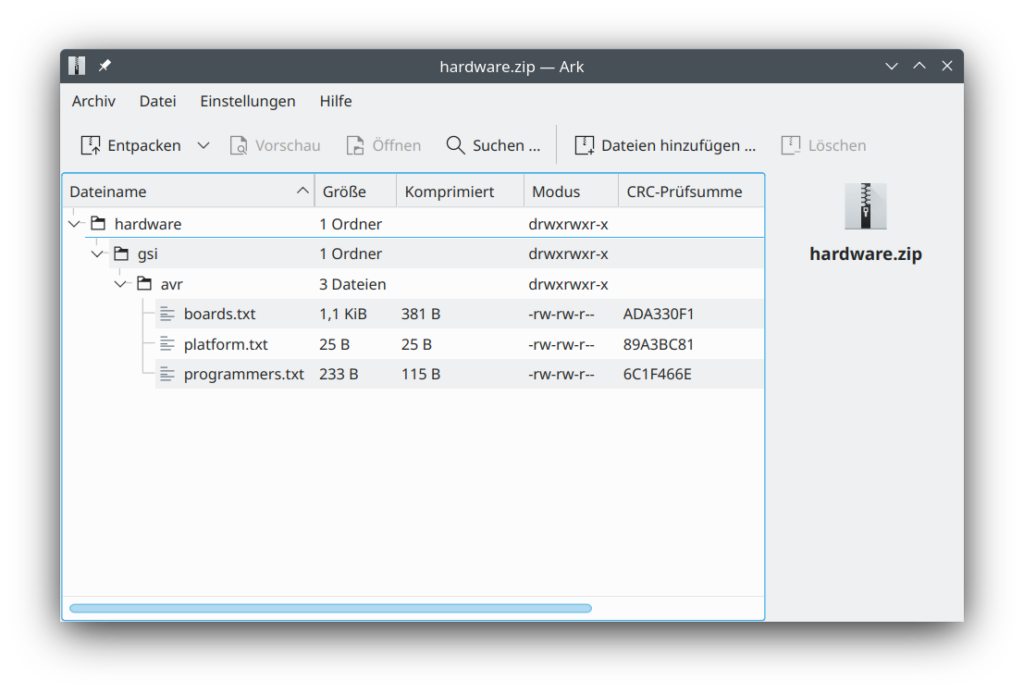
Screenshot of the archive showing the folder hierarchy: "hardware/gsi/avr/" with the three relevant files "boards.txt", "platform.txt" and "programmers.txt".

And there you have a slightly more portable and cleaner solution to writing your own hardware platform.

*) This was done on Arduino IDE version 1.8.19 and should work for quite a while (probably after version 1.5.x). AFAIK, this should work similarly with the new 2.0 IDE. But I did not test this.

Categories
FPGA VHDL

Interesting details of ieee.fixed_pkg

Today I learned that in order to assign a negative sfixed (signed fixed-point) signal or variable to another signal or variable, I have to use resize.

process
    variable x0: sfixed(7 downto -8) := to_sfixed(1, 7, -8);
    constant val: sfixed(7 downto -8) := to_sfixed(10, 7, -8);
begin
    -- does not work:
    x0 := -val;
    
    -- this does work:
    x0 := resize(-val, x0);
end process;

So, it seems, internally this is an actual multiplication and not a manipulation on the signed value.

This holds for GHDL 3.0 using the VHDL-2008 standard. No idea yet what other tools do with this.

Categories
Uncategorized

I ditched Twitter…

… for all the obvious reasons.

Since then, I have noticed that I had addictive behavioural patterns. Given the relative smallness (is that a word) of the Fediverse, I hope I will do more sensible stuff with my time.

I had noticed this before, when I ditched Facebook. So, bottom line: “social media” isn’t good for me.

Categories
Political Rants

Wir sind Amateure

Beobachtung 1: Die Akw-Debatte ist nicht vorbei. Die halbe FDP träumt vom Wiedereinstieg (von der CDU mal ganz zu schweigen). Die Verlängerung jetzt wird dort als Dammbruch gesehen.

Beobachtung 2: Die Verlängerung nicht zu wollen hilft der #Energiewende kein Iota. Unsere Energieinfrastruktur ist ein riesiges, komplexes System, das sehr, sehr lange Antwortzeiten auf Änderungen hat. Deswegen braucht es langfristige (20+ Jahre) Konsense, die nicht alle naslang wieder geändert werden (egal was die konkrete Richtung nun ist, das will ich hier gar nicht bewerten).

Beobachtung 3: Mich erinnert die Akw-Debatte massiv an die französische Präsidentschaftsdebatte 2007 zwischen Royale und Sarkozy, bei der in einigen sehr, sehr peinlichen Minuten im Fernsehen klar wurde, dass niemand im Studio (weder die Kandidat:innen noch die Moderator:innen) wussten, wovon sie da eigentlich sprachen. Wir führen derzeit öffentlich eine ähnlich uninformierte Debatte. Da wird Zeugs durcheinander geworfen, es werden irgendwelche Gutachten für irgendwelche Meiler gemacht und rumgeworfen (egal, was eigentlich genau drinsteht), es wird x Mrd. Tonnen Benzin mit x TWh Uranstrom verglichen.
Für ne angebliche technologische Gesellschaft sind wir ziemliche Amateure. Die Zunft der Energietechniker tut sich da gerade auch nicht besonders hervor: Sie scheint gespalten und die Altvorderen Großanlagen-Fans scheinen mit der jüngeren Agile-Netze-Fraktion nicht viel zu sprechen. Mag aber nur mein Eindruck sein.

Insofern kann man eigentlich nur sagen: Wer immer bei der Energiepolitik irgendwelche kurzfristigen Absichten verfolgt, handelt vollkommen verantwortungslos. Das gilt für Merkels (CDU btw) Ausstieg aus dem Ausstieg (A²), für Merkels Ausstieg aus dem Ausstieg aus dem Ausstieg (A³), und für die aktuelle Debatte, wo ironischerweise Grüne und FDP auf der falschen Seite stehen.
Man könnte der FDP noch zugute halten, dass sie ja in Wirklichkeit wieder langfristig zurück zum Atom wollen. Dass sie dafür aber keinen gesellschaftlichen Konsens haben, zaubern sie einfach aus ihrem Bewusstsein.
Bei der Pandemie haben wir’s irgendwie geschafft, wengistens ein wenig Ruhe und Informiertheit in die Debatte zu bringen (wenn man an der richtigen Stelle geschaut hat).

Wie kommen wir da raus?

Schritt 1: Etabliere einen breiten Konsens, dass wir aus allen fossilen Energieträgern so schnell wie möglich rausmüssen.

Schritt 2: Etabliere einen Konsens über die Kosten des einzuschlagenden Weges.**

Schritt 3: Arbeite den Weg aus und lege ihn mit Prüf-Meilensteinen auf 20 Jahre fest.

Oh, und btw: Das hab ich mir nicht ausgedacht. Das stand schon fucking 1987 im Brundland-Bericht.

Da kann in Schritt 2 oder 3 drinstehen, dass die Akw noch 5 Jahre weiterlaufen. Aber es muss auch a) klar sein, wo der Brennstoff herkommt (Russland ist ein Big Player in dem Bereich, shaise was?) und b) die aktuell noch stehenden Akw sind irgendwann einfach durch und müssen ausgeschaltet werden.
Es muss in den Meilensteinen auch festgelegt werden, wie deren Abschaltung dann kompensiert werden wird. Es darf dann nicht in 5 oder 10 Jahren einen Altmeier geben, der andere, bereits festgelegte Meilensteine einfach umwirft oder wie Wissing einfach ignoriert.

Die Grünen agieren bei Atomkraft nicht kühl. Ihre Ablehnung enthält eine rationale Komponente, aber eben auch ne Menge irrationalen Quatsch wie bei der Zustimmung zur Homöopathie.

  • Ja, man kann Akw hinreichend sicher betreiben.
  • Nein, wenn es knallt wäre das nicht Fallout 2. Sorry, Grüne.
  • Aber ja klar, wir haben uns keine Sekunde ernsthaft Gedanken gemacht, wie ein Fukushima in Europa oder Deutschland aussehen würde. Es wären Hundertausende umgesiedelte Haushalte und ein Kostenberg von aktuell geschätzt über 150 Mrd. €.
  • Ja, Atomkraft ist keine unendliche Energiequelle. Aber es geht nicht um die Menge des verfügbaren Brennstoffes. Auch Kohle würde ja noch ziemlich lang reichen. Uran ist aber eine Energiequelle, die man durch Logistiknetze bezieht. Mit Playern, die Interessen haben. Bei deren Quellen man sich genauso diversifizieren muss wie wir das beim Gas gesehen haben, sonst hat einer einen am Sack.
  • Und nein, Erneuerbare sind nicht kostenlos; sie müssen noch gebaut werden und müssen auch gewartet werden. Aber a) fällt die Brennstofffrage weg und b) schöpfen wir in Europa unser Potential noch nicht mal ansatzweise aus.

Soweit zum Grünen-Bashing. Aber das sind halt nicht die einzigen Irrlichter: Hey, FDP und CDU, ich hoffe, ihr habt jetzt schon kapiert, dass Kernkraft nicht russlandfrei ist.

Und ja: Es fehlt an Speichern. Aber statt hier echte Forschungs- und Industriepolitik zu betreiben und Entwicklung und Fertigung in Europa aufzubauen, hat man* das Heft einfach komplett aus der Hand gegeben (hier dürfen sich CDU- und CSU-Politiker nicht nur mitgemeint fühlen). Nicht nur in Sachen Fertigung. Auch in Sachen Rohstoffe und mittlerweile auch in Sachen Technologie.

Ironischerweise ist dabei immer mit dem Standort* Deutschland argumentiert worden (*: Wirtschafts-, Technologie-). Jo, also den haben wir in Energiefragen ziemlich schlecht aufgestellt. Danke für nix.

Wir sind an nem Punkt, wo es gut wäre, statt sich schrille, heisere BS-Tweets an den Kopf zu werfen, all die o.g. Schritte durchzugehen und eine langfristige Strategie zu entwerfen.

Nicht Plan.

Strategie.

Unter Einbindung der gesamten EU.

Und ein guter Ort dafür wäre übrigens nicht Twitter-Deutschland. Aber so z.B. der fucking Bundestag!

Aber offen gestanden halte ich das Problem für so groß, dass wir subsidiär mit den EU-Mitgliedsstaaten auf der falschen Ebene sind. Es ist ein Mehrebenenproblem, aber die Strategie für sowas entwickelt man dann nicht 27-mal in den MS-Parlamenten. Sondern z.B. im EP, der KOM und, ja auch, im EUCO.

Und huch (Lichtblick): es gibt ja durchaus ein Framework auf EU-Ebene. Vielleicht hört man also mal auf, es andauernd zu blockieren, formuliert (die durch berechtigte) Kritik, nimmt sich die Zeit, zu erklären, was man vorhat, und macht es dann.

**) Ich habe bewusst das Thema Kosten soweit ausgespart, wie es nur geht, denn Schritt 1, der Ausstieg aus dem Fossilen, ist oberste Prämisse. Die Kostendiskussion ist in meinen Augen eine, die man nicht ernsthaft führen kann. Sie ist äußerst komplex und in einer öffentlichen Debatte nicht wirklich zu fassen. Und damit lässt sie Tür und Tor offen, in Geiselhaft genommen zu werden: Für eine lämende Klein-Klein-Debatte mit Scheinargumenten und viel Rauch.

Categories
Engineering Political Traffic

BabyRanger v0.1

Breadboard with connected breakouts: ESP32 NodeMCU, microSC card slot, NEO-M8M GPS module with antenna, Sparkfun battery babysitter with battery and two 3.3V capable HC-SR04 ultrasonic range sensors

The annoyance by pavement and walkways blocked by parked cars has been rising again when I went back to parental leave with our second child. On the mere 900m from home to childcare, I was regularly blocked by parked cars despite the buggy only being 55cm wide.

The idea to measure and track the remaining width after motorists left their junk on/in my way grew already back in 2019. But there were always parts or time missing. Now finally, I am plugging together a little contraption that should be able to do what I want it to do: show and quantify how little space is left for pedestrians and how much of an obstacle this is to people who rely on small carts to help them move: parents, but also elderly with a walker or people in wheelchairs.

First things first: This is basically a remake of the famous OpenBikeSensor, which should – with a different firmware – totally work for this purpose, too. This is not about remaking the OBS. It’s rather a little write-up of what the process is about. And, of course, the proposal to use OBS or similar hardware to use for pavement width tracking (PWT, I guess I need a fancy three-letter shorthand 🤣).

The Sociopolitical Problem

For decades the city council of Darmstadt has simply tolerated parking on pavements. So much so that it is a very common sight in the city. This holds for many other German cities, too. But it causes trouble for pedestrians: You cannot walk next to each other, you can pass oncoming people only awkwardly (even more so during the pandemic), and finally if you’re trying to walk your baby to sleep or simply get somewhere with her or him, it’s close to scratching the sacred shiny finish of a car (Heil’ges Blechle) at best.

This is considered totally normal in Darmstadt: The pavement measures about 1.6-1.8 m but at least 50 cm of this width is occupied by wheeled sheet metal 23 hours a day. Such nicely cut green to the left is not the standard, by the way.
You shall not pass: mailboxes, electrical and utilities boxes, parking ticketing machines (ironically), e-scooters or mere idiots inapt of proper parking block the way.

While the latter is an obvious problem (you’re blocked and have to cross the street or walk there), reporting such cases is a nuisance: call the #Unordnungsamt and if you’re lucky and someone picks up, they may come days later and instead of removing the car just fine the holder (the blocking car on the left was left in place for three days, the one in the middle for at least eight days). You can also report the car to the authorities. If you do that more often and happen to live in Bavaria, you risk a fine based on (imho grossly abused) data protection legislation (often being 8 times in the particular case). And then there are reports of city councils not going after the offenders even if presented with full evidence (at least this cannot be said for Darmstadt).

But the first, the constant abuse of pavement for parking, is indeed a problem. We have two push vehicles for our kids: one is a buggy (55 cm wide), one is a two seated bike trailer that works as buggy too (85 cm wide). Those are not excessive widths. The latter is about 15 cm wider than a wheelchair – though bear in mind that you need your hands to move the wheels, so 90 cm is consider the minimum passage width.

The hypothesis I want to prove with the BabyRanger (or any modified OBS) is: A large part of the public space is being obstructed by parked cars because pavement parking is tolerated.

The Technical Problem

Measuring distances ain’t easy. Estimating the distance between two obstacles left and right in a straight line, ideally perpendicular to either (at least one of) the obstacles’ surfaces, the walking direction and/or the footpath path direction is a different story still.

Other problems I can think of: Deciding which side of the street you are on. Whether you are blocked and have to change sides or simply wanted to cross the street. How to detect if the sensors are misplaced. How to install the system on the various kinds of carts there are. And so on…

Mapping those data in a geographically meaningful way without disclosing the whereabouts and routes of the user of the system, and how to visualise the whole thing, is a yet another story.

What I’m Currently Doing

At the moment all I am struggling with is the GPS module. I chose NeoGPS as framework and it’s powerful, but pretty easy to get lost in. At the moment, UART is doing its thing, the logic analyser can read meaningful data at the chosen settings too, and NMEA sentences are transmitted.

However, they only fill the buffer but don’t produce any fixes let alone position data.

So: I’m in between tinkering a little more or switching to a different framework.

[Update 2022-10-15]

Well, the 3.3V SD card breakouts arrived yesterday, so let’s go for a walk. Roughly 20 minutes (i.e. ~1200 seconds) and guess what this beauty scribbled to flash drive:

Measured distance between left and right walls during a 20 minutes walk with the BabyRanger v0.1. And yes, I hate myself too for plotting this in LibreOffice Calc.

So, even though I would say it’s been a very tidy situation on the pavements (judging from experience in the street I walked down), here we go: Below 100 cm almost half the time and towards the end down to 50 cm. To be taken with a huge pinch of salt though until stuff like alignment, stability, unexpected obstacles etc. are properly taken care of.

[End of Update 2022-10-15]

Invitation

While I will be able to devote only limited time on this, I invite anyone with an OBS to see what solution they could think of. And to contact me if you’re interested to work on this issue ☟