Categories
Hardware Linux

Firefox/LibreWolf taking down graphics stack on Wayland with AMD GPU

I keep having screens freezing seemingly randomly on my AMD Strix Halo GPU on Wayland whenever (and it seems only if!) I’m using Firefox/LibreWolf.

I can recover fine: Unplug the HDMI or DisplayPort cable of the affected screen, wait a few seconds and the graphics stack resets and everything is back to normal.

When this happens, I get the following module panic retrievable via dmesg:

[69348.590903] amdgpu 0000:c4:00.0: [drm] ERROR [CRTC:86:crtc-0] flip_done timed out
[69362.413939] amdgpu 0000:c4:00.0: [drm] ERROR flip_done timed out
[69362.413954] amdgpu 0000:c4:00.0: [drm] ERROR [CRTC:86:crtc-0] commit wait timed out
[69372.653095] amdgpu 0000:c4:00.0: [drm] ERROR flip_done timed out
[69372.653111] amdgpu 0000:c4:00.0: [drm] ERROR [PLANE:83:plane-7] commit wait timed out
[69843.658648] amdgpu 0000:c4:00.0: [drm] ERROR [CRTC:86:crtc-0] flip_done timed out
[69845.208181] workqueue: dm_irq_work_func [amdgpu] hogged CPU for >10000us 4 times, consider switching to WQ_UNBOUND
[69853.896845] amdgpu 0000:c4:00.0: amdgpu: [drm] ERROR [CRTC:86:crtc-0] hw_done or flip_done timed out
[69864.136149] amdgpu 0000:c4:00.0: [drm] ERROR flip_done timed out
[69864.136165] amdgpu 0000:c4:00.0: [drm] ERROR [CRTC:86:crtc-0] commit wait timed out
[69874.375292] amdgpu 0000:c4:00.0: [drm] ERROR flip_done timed out
[69874.375309] amdgpu 0000:c4:00.0: [drm] ERROR [PLANE:83:plane-7] commit wait timed out
[69874.456995] ------------[ cut here ]------------
[69874.456998] WARNING: CPU: 28 PID: 411 at drivers/gpu/drm/amd/amdgpu/../display/amdgpu_dm/amdgpu_dm.c:9074 amdgpu_dm_commit_planes+0x10c3/0x1620 [amdgpu]
[69874.457496] Modules linked in: tls snd_seq_dummy snd_hrtimer xfrm_interface xfrm6_tunnel tunnel4 tunnel6 xfrm_user xfrm_algo rpcsec_gss_krb5 twofish_generic twofish_avx_x86_64 twofish_x86_64_3way twofish_x86_64 twofish_common serpent_avx2 serpent_avx_x86_64 serpent_sse2_x86_64 serpent_generic blowfish_generic blowfish_x86_64 blowfish_common cast5_avx_x86_64 cast5_generic cast_common nft_masq des3_ede_x86_64 nfsv4 des_generic libdes camellia_generic camellia_aesni_avx2 camellia_aesni_avx_x86_64 camellia_x86_64 nft_chain_nat nf_nat xcbc nf_conntrack nf_defrag_ipv6 nf_defrag_ipv4 md4 nfs netfs bridge stp llc vxlan nf_tables ip6_udp_tunnel udp_tunnel ccm overlay qrtr rfcomm cmac algif_hash algif_skcipher af_alg bnep binfmt_misc zfs(PO) spl(O) nfsd nfs_acl sch_fq_codel lockd grace msr parport_pc ppdev lp parport joydev btusb btrtl btintel btbcm btmtk bluetooth wacom input_leds amd_atl intel_rapl_msr intel_rapl_common snd_acp70 snd_acp_i2s snd_acp_pdm snd_acp_pcm snd_sof_amd_acp70 snd_sof_amd_acp63 snd_sof_amd_vangogh
[69874.457550] snd_sof_amd_rembrandt snd_sof_amd_renoir snd_hda_codec_alc662 snd_sof_amd_acp snd_hda_codec_realtek_lib snd_sof_pci snd_hda_codec_generic snd_sof_xtensa_dsp snd_sof snd_sof_utils snd_hda_codec_atihdmi snd_pci_ps snd_hda_codec_hdmi snd_soc_acpi_amd_match snd_amd_sdw_acpi soundwire_amd soundwire_generic_allocation soundwire_bus edac_mce_amd snd_soc_sdca mt7925e snd_hda_intel mt7925_common snd_hda_codec snd_soc_core snd_usb_audio mt792x_lib snd_hda_core snd_compress mt76_connac_lib snd_intel_dspcfg ac97_bus mt76 snd_pcm_dmaengine snd_usbmidi_lib snd_intel_sdw_acpi kvm_amd snd_ump snd_hwdep snd_rpl_pci_acp6x snd_seq_midi snd_acp_pci mac80211 snd_seq_midi_event snd_amd_acpi_mach snd_acp_legacy_common kvm nls_iso8859_1 uvcvideo snd_rawmidi snd_pci_acp6x videobuf2_vmalloc snd_pcm uvc snd_seq videobuf2_memops videobuf2_v4l2 snd_seq_device irqbypass videobuf2_common snd_timer polyval_clmulni snd_pci_acp5x cfg80211 ghash_clmulni_intel videodev snd_rn_pci_acp3x snd snd_acp_config aesni_intel i2c_piix4 snd_soc_acpi
[69874.457591] mc rapl wmi_bmof libarc4 ccp amdxdna soundcore snd_pci_acp3x k10temp i2c_smbus soc_button_array amd_pmc mac_hid amdgpu amdxcp drm_panel_backlight_quirks gpu_sched drm_buddy drm_ttm_helper ttm drm_exec drm_suballoc_helper drm_display_helper auth_rpcgss cec rc_core i2c_algo_bit nvme_fabrics sunrpc efi_pstore nfnetlink dmi_sysfs ip_tables x_tables autofs4 btrfs blake2b_generic raid10 raid456 async_raid6_recov async_memcpy async_pq async_xor async_tx xor raid6_pq raid1 raid0 linear hid_generic usbhid sdhci_pci nvme sdhci_uhs2 psmouse thunderbolt nvme_core serio_raw sdhci nvme_keyring video i2c_hid_acpi cqhci nvme_auth i2c_hid wmi hid
[69874.457638] CPU: 28 UID: 0 PID: 411 Comm: kworker/28:1H Kdump: loaded Tainted: P O 6.17.0-14-generic #14-Ubuntu PREEMPT(voluntary)
[69874.457644] Tainted: [P]=PROPRIETARY_MODULE, [O]=OOT_MODULE
[69874.457645] Hardware name: AZW GTR Pro/GTR Pro, BIOS GTRP108 09/16/2025
[69874.457648] Workqueue: events_highpri dm_irq_work_func [amdgpu]
[69874.458008] RIP: 0010:amdgpu_dm_commit_planes+0x10c3/0x1620 [amdgpu]
[69874.458309] Code: e8 f2 5a ff ff 4c 8b 9d 78 ff ff ff e9 c2 f9 ff ff 31 c9 48 85 d2 0f 85 cb fe ff ff e9 bf f8 ff ff 0f 0b 0f 0b e9 f7 fe ff ff <0f> 0b e9 0f ff ff ff 48 8b 45 88 be 01 00 00 00 4c 89 9d 30 ff ff
[69874.458311] RSP: 0018:ffffd10e41b3f9e8 EFLAGS: 00010082
[69874.458315] RAX: 0000000000000001 RBX: 0000000000000246 RCX: 0000000000000000
[69874.458317] RDX: 0000000000000000 RSI: 0000000000000000 RDI: 0000000000000000
[69874.458318] RBP: ffffd10e41b3fae8 R08: 0000000000000000 R09: 0000000000000000
[69874.458319] R10: 0000000000000000 R11: 0000000000000000 R12: ffff8d5aa6f45b18
[69874.458320] R13: 0000000000000000 R14: ffff8d5aa8dcc000 R15: ffff8d5a8d682c00
[69874.458322] FS: 0000000000000000(0000) GS:ffff8d718b87f000(0000) knlGS:0000000000000000
[69874.458324] CS: 0010 DS: 0000 ES: 0000 CR0: 0000000080050033
[69874.458325] CR2: 00007ef8da7208f0 CR3: 00000015d0c40000 CR4: 0000000000f50ef0
[69874.458327] PKRU: 55555554
[69874.458329] Call Trace:
[69874.458331] [69874.458337] ? manage_dm_interrupts+0xa3/0x210 [amdgpu] [69874.458606] amdgpu_dm_atomic_commit_tail+0xa77/0x1130 [amdgpu] [69874.458862] commit_tail+0xc0/0x1b0 [69874.458868] ? drm_atomic_helper_swap_state+0x2d2/0x3a0 [69874.458872] drm_atomic_helper_commit+0x153/0x190 [69874.458874] drm_atomic_commit+0xaa/0xf0 [69874.458877] ? __pfx___drm_printfn_info+0x10/0x10 [69874.458883] dm_restore_drm_connector_state+0x102/0x170 [amdgpu] [69874.459125] handle_hpd_irq_helper+0x1a3/0x1e0 [amdgpu] [69874.459360] handle_hpd_irq+0xe/0x20 [amdgpu] [69874.459592] dm_irq_work_func+0x16/0x30 [amdgpu] [69874.459824] process_one_work+0x18b/0x370 [69874.459830] worker_thread+0x317/0x450 [69874.459833] ? _raw_spin_lock_irqsave+0xe/0x20 [69874.459839] ? __pfx_worker_thread+0x10/0x10 [69874.459842] kthread+0x108/0x220 [69874.459845] ? __pfx_kthread+0x10/0x10 [69874.459848] ret_from_fork+0x131/0x150 [69874.459853] ? __pfx_kthread+0x10/0x10 [69874.459855] ret_from_fork_asm+0x1a/0x30 [69874.459860]
[69874.459861] ---[ end trace 0000000000000000 ]---
[69874.498959] workqueue: dm_irq_work_func [amdgpu] hogged CPU for >10000us 5 times, consider switching to WQ_UNBOUND
[69874.722942] workqueue: dm_irq_work_func [amdgpu] hogged CPU for >10000us 7 times, consider switching to WQ_UNBOUND
[69874.841943] workqueue: dm_irq_work_func [amdgpu] hogged CPU for >10000us 11 times, consider switching to WQ_UNBOUND

It’s super annoying but not the end of the world. I would like to debug it, however, to find out who’s going to get the issue posted: Firefox, LibreWolf, Wayland or AMD?

Any ideas? Let me know @cweickhmann@qoto.org.
Categories
Linux Python

Massive Nextcloud log file quickly analysed using Python

I ran into a problem with quite a buggy Nextcloud instance on a host with limited quota. The Nextcloud log file would baloon at a crazy rate. So at one point, I snatched a 700 MB sample (yeah, that took maybe an hour or so) and wondered: what’s wrong?

So, first things first: Nextcloud’s log files are JSON files. Which makes them excruciatingly difficult to read. Okay, better than binary, but still, not an eye pleaser. They wouldn’t be easy to grep either. So, Python to the rescue as it has the json module*.

First, using head I looked at the first 10 lines only. Why? Because I had no idea of the performance of this little script of mine and I wanted to check it out first.

head -n 10 nextcloud.log > nextcloud.log.10

Because these logs are scattered with user and directory names and specifics of that particular Nextcloud instance (it’ll be NC from here on), I won’t share any of them here. Sorry. But if you have NC yourself, just get it from the /data/ directory of your NC instance.

I found each line to contain one JSON object (enclosed in curly brackets). So, let’s read this line-by-line and feed it into Python’s JSON parser:

import json

with open("nextcloud.log.10", "r") as fh:
    for line in fh:
        data = json.loads(line)

At this point, you can already get an idea of how long each line is processed. If you’re using Jupyter Notebook, you can place the with statement into its own cell and simply use the %%timeit cell magic for a good first impression. On my machine it says

592 µs ± 7.65 µs per loop (mean ± std. dev. of 7 runs, 1,000 loops each)

which is okay: roughly 60 µs per line.

Next, I wanted to inspect a few lines and make reading easier: pretty print, or pprint as its module is called, to the rescue!

from pprint import pprint

pprint(data)

This pretty prints the last line. If you want to access all 10 lines, create for instance an empty array data_lines first and do data_lines.append(data) inside the for loop.

{'reqId': '<redacted>',
 'level': 2,
 'time': '2025-02-06<redacted>',
 'remoteAddr': '<redacted>',
 'user': '<redacted>',
 'app': 'no app in context',
 'method': 'GET',
 'url': '/<redacted>/apps/user_status/api/<redacted>?format=json',
 'message': 'Temporary directory /www/htdocs/<redacted>/tmp/ is not present or writable',
 'userAgent': 'Mozilla/5.0 (Linux) <redacted> (Nextcloud, <redacted>)',
 'version': '<redacted>',
 'data': []}

Okay, there is a message which might be interesting, but I found another one:

{'reqId': '',
'level': 0,
'time': '2025-02-06T',
'remoteAddr': '',
'user': '',
'app': 'no app in context',
'method': 'PROPFIND',
'url': '//',
'message': 'Calling without parameters is deprecated and will throw soon.',
'userAgent': 'Mozilla/5.0 (Linux) (Nextcloud, 4)',
'version': '',
'exception': {'Exception': 'Exception',
   'Message': 'No parameters in call to ',
    …

Now, this is much more interesting: It contains a key exception with a message and a long traceback below.

I simply want to know:

  • How many of these exceptions are there?
  • How many unique messages are there?

In other words: Is this a clusterfuck, or can I get this thing silent by fixing a handful of things?

So, the idea is simple:

  1. Read each line.
  2. Check if the line contains an exception keyword.
  3. In that case, count it and…
  4. … append the corresponding message to a list.
  5. Finally, convert that list into a set.

And here is how this looks in Python:

import json
from pprint import pprint

lines = 0
exceptions = 0
ex_messages = []

with open("nextcloud.log", "r") as fh:
    for line in fh:
        lines += 1
        data = json.loads(line)
        
        if "exception" in data.keys():
            exceptions += 1
            msg = data["exception"]["Message"]
            ex_messages.append(msg)

print(f"{lines:d} read, {exceptions:d} exceptions.")

s_ex_msg = set(ex_messages)
print(f"{len(s_ex_msg):d} unique message types.")

pprint(s_ex_msg)

I had

37460 read, 32537 exceptions.
22 unique message types.

That’s a lot of exceptions but a surprisingly small number of unique messages, i.e. possible individual causes.

In my case, it mainly showed me what I knew beforehand: The database was a total mess.

But see what you find.

Exercise: See how you need to modify the script to count how many out of the 32537 exceptions correspond to each of the 22 unique messages. And toot about it.

*) I wonder if people will come and propose to use simplejson, as I’ve read in the wild, because “it’s faster!!!”. Use %%timeit to find out. Anything else is Mumpitz (forum voodoo).

Categories
Hardware Linux

Working on LDD3’s tiny tty example

A while back I started tipping my toes into Linux Kernel module development. Mainly, to understand a driver for a data capture card I got to work with (or for, I believe).

Well, there is a go-to reference: the book Linux Device Drivers, 3rd Edition by Corbet, Rubini and Kroah-Hartman (from now on LDD3).

It’s great, it explains a lot and contains lots of hands-on example code, too. But, unfortunately it refers to the 2.6 Linux kernel. We’re at 6.8 at the time of writing this. So it’s a bit outdated.

No worries though, FOSS is a beautiful beast, and people have taken the example modules and updated them. Around version 5.15 that is. And things have changed again – at least for tty it seems.

There is a pull request to make it 6.x compatible, but … it’s almost a year old by now, and it seems incomplete. Yet, it was a really great thing to come across at the start of this journey, because it restored my sanity.

So, here’s my go at the tiny tty example driver and I hope I can finish it up into something that works with a 6.x Linux kernel.

Things have changed

Using static major/minor numbers is discouraged, or at least, made easier to avoid in more recent kernel versions (feels like since 4.x or so). So, some functions used in LDD3’s examples simply don’t exist anymore.

alloc_tty_driver is now superseeded by tty_alloc_driver (okay, that re-naming is kind of evil). And while the former only bothered about the number of supported ports, the latter wants flags, too. So, it looks like the returned struct of type tty_driver already contains a lot of entries when tty_alloc_driver is done with it.

I’ve refrained from using the TTY_DRIVER_NO_DEVFS flag, because I think dynamic stuff is always nice, so TTY_DRIVER_DYNAMIC_DEV it is.

tty_driver->owner is not supposed to be set anymore, according to this old’ish LKLM post. Same goes for ->major (see tty_alloc_driver).

The module is not put down anymore by put_tty_driver but by tty_driver_kref_put which seemingly also handles references in proc (I’ve run into issues that the proc entry was not removed after rmmoding the module and hence, on the next try insmod was complaining).

I mention this, because LDD3’s static void __exit tiny_exit(void) spends two thirds of its code to close ports and kfree associated memory. This code is still present in the pull request with the updated example from 2023.

Still, I have to investigate if tty_driver_kref_put also removes timers.

Things have gotten easier

Compared to the example for a 2.6 kernel in LDD3, the current version (at least for module __init and __exit) is way easier and frankly cleaner, i.e. easier to read.

Still, or maybe exactly because of that, I think it’s time for a fourth edition of Linux Device Drivers.

I try to go through with the rest of the module and understand and ideally fix it. Then I’ll upload it too, for later generations at kernel 8.x to despair of it. Link soon.

Categories
Embedded Engineering Linux Python

Red Pitaya using only pyVISA

The Red Pitaya boards offer an SCPI server over an TCP/IP Socket connection. The makers describe how to use it. But instead of using plain pyVISA, they provide their own SCPI class.

That’s fine, because that class also provides handy functions to set the various in-built applications (signal generator and the likes).

But it is unnecessary complicated for a blinky example. And in my case, where I only needed some scriptable DIOs, it was quite cumbersome.

So, here is the blinky re-written in plain pyVISA:

import pyvisa as visa
from time import sleep

rm = visa.ResourceManager()
rp = rm.open_resource("TCPIP::169.254.XXX.XXX::5000::SOCKET",
                 read_termination="\r\n",
                 write_termination="\r\n"
                 )

print(rp.query("*IDN?"))

while True:
    rp.write("DIG:PIN LED0,1")
    sleep(.5)
    rp.write("DIG:PIN LED0,0")
    sleep(.5)

The magic lies in the read and write terminations. They have to be set to '\r\n'(in that order), or else the communication simply won’t work and time out.

Make sure you install a reasonably recent pyVISA and pyVISA-py (from pip) or libvisa (from your distro’s repository) before you start. For me (Ubuntu) this works as follows:

pip install -U pyvisa pyvisa-py
sudo apt install libvisa

This integrates nicely with existing instrument command structures and allows for quick testing.

Categories
Linux

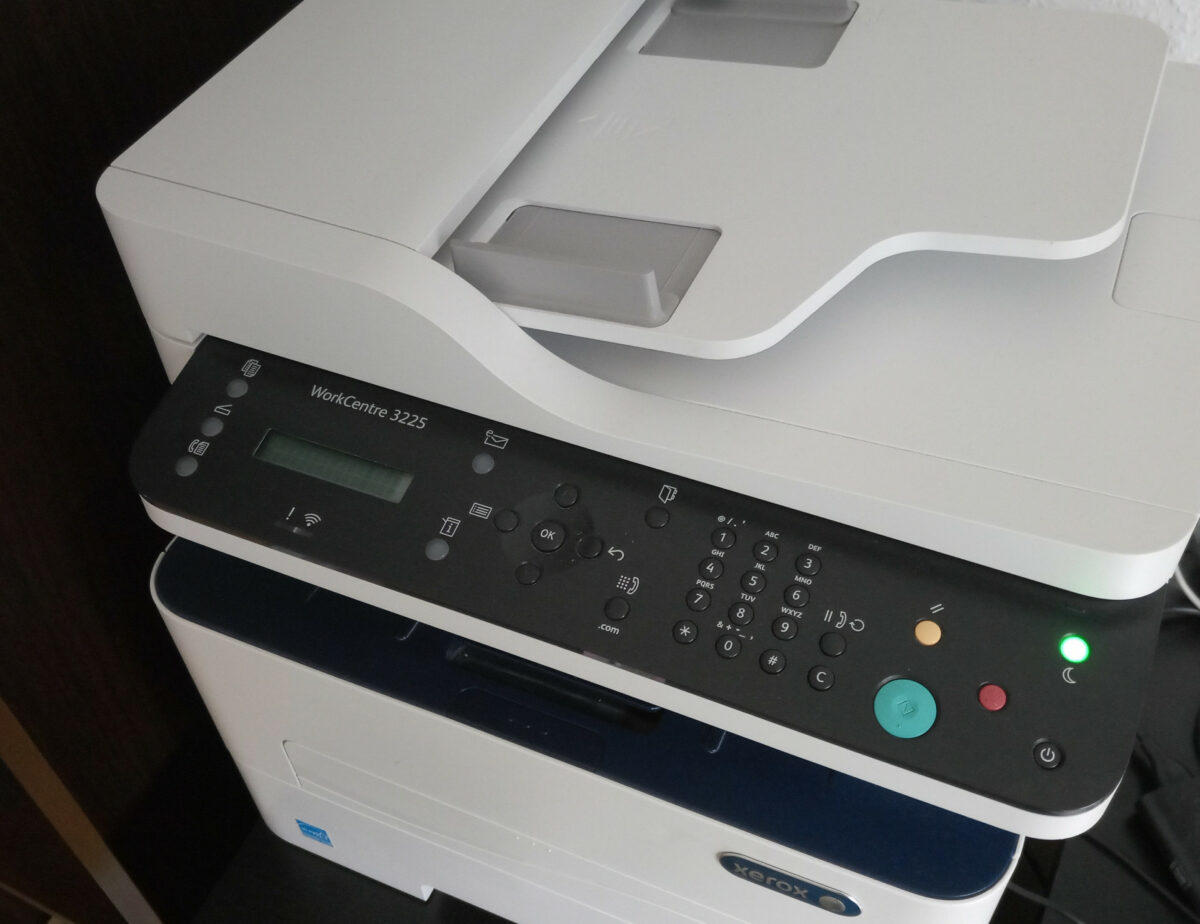
Xerox WorkCentre 3225 works with CUPS’ Xerox WorkCentre 7345 Driver

The heading is basically all. The WorkCentre 7345 driver supports lots of things that are not supported by the WorkCentre 3225 printer. However, and that’s why this is important:

It (7345) is available for ARM architectures, 3225 is not.

Why is this important? Because when you want to run a small SBC to make that printer Wifi capable in a non-annoying way, you cannot use the Xerox provided ARM driver as it does not support armhf, armv7l and the likes that you find on many SBCs, like the Raspberry Pi or the Tinkerboard it is running on now.

Categories
Hardware Linux

Dell XPS 9310 (Evo) does run Ubuntu* 22.04 (Kernel 5.15)

Just a quick post today confirming that you can actually take a Dell XPS 13 9310 (Evo) shipped with Windoze 11, and run a vanilla Ubuntu 22.04 on it with all peripherals working and no fuzz (well, some, if you do it the way I did).

I basically took my SSD from my old Dell XPS 13 9350 (yes, 9310 is much newer than 9350 – hardware manufacturers move in mysterious ways) and plucked it into the new 9310. This booted up with no issues and I thought I was good to go. Until, that is, I realised that my Wifi was indeed not working.

The problem was solved, when I removed older firmware files out of /lib/firmware, and got the newest (version 73, as of today) from the kernel archive. Admittedly, this step was not necessary, as I later found out that virtually every version from 55 upwards should be working. But who cares.

So, what you want to have in your /lib/firmware directory is this:

user@laptop:~$ uname -r
5.15.0-43-generic

user@laptop:~$ lsb_release -a
No LSB modules are available.
Distributor ID:	Ubuntu
Description:	Ubuntu 22.04.1 LTS
Release:	22.04
Codename:	jammy

user@laptop:~$ ls /lib/firmware/iwlwifi-QuZ*
/lib/firmware/iwlwifi-QuZ-a0-hr-b0-55.ucode
...
/lib/firmware/iwlwifi-QuZ-a0-jf-b0-73.ucode

And your new, used Dell XPS 13 9310 which came with anoying Windoze 11 now works like a charm with Ubuntu 22.04.

*) By the way: This should be completely distribution-agnostic, since it’s really only the Kernel and the AX201 Wifi adapter firmware version that counts. Docs say from Kernel 5.8 onwards iwlwifi‘s support for AX201 left experimental state and should therefore work. It may show more hiccups with older versions concerning e.g. sleep states, though.

Categories
Docker FPGA Linux

Running Xilinx ISE 14.7 in Docker

In an earlier post, I wanted to get Xilinx ISE 14.7 to run on an up-to-date Ubuntu 22.04 LTS which failed miserably.

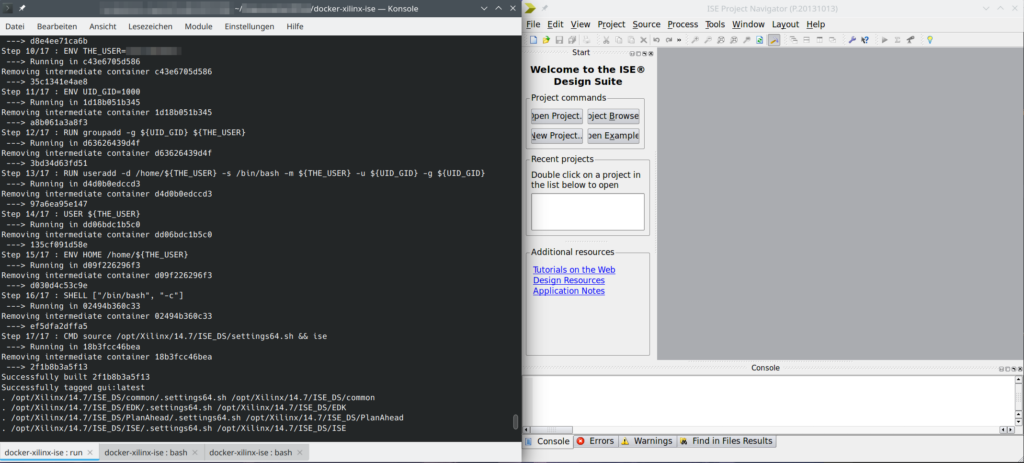
So, instead I chose the container route using Docker. This seems to work quite well, so I’d like to share it with anyone interested.

I’ve packed a working setup in a Gitlab repository.

ISE 14.7 running in a Docker container (guest: Ubuntu 14.04, host: Ubuntu 22.04)

This is still work-in-progress, as I have not tackled the license, yet.

Update 2022-07-15: I’ve added gcc to the installed packages to allow ISim to actually do something useful. The issue with Firefox (opening online documentation) seems to stem from the fact that Firefox is built against glibc++ 3.4.9-11, but ISE ships a libstdc++6 file which provides only up to 3.4.8. When sourcing the settings64.sh script, the libraries are messed with and only the shipped libstdc++6 is available.

Categories
Engineering FPGA Hardware Linux

Xilinx ISE 14.7 and SDK on Ubuntu 22.04

As discussed in [Insanity4004]’s excellent blog post, Xilinx packages their ISE and SDK suite with the necessary libraries (like Qt4 for example). Unfortunately, some seem to be missing and cause errors that are rather cryptic for the lay(wo)man.

In addition to providing libpng and libfreetype, I’ve noticed that in order to start the SDK (xsdk, part of the EDK package), you need to provide an older version of libcairo as well.

With the standard installation, starting xsdk results in:

[...]/EDK/bin/lin64 $ ./xsdk

  Xilinx Software Development Kit
  Xilinx EDK 14.7 Build EDK_P.20131013
  Copyright (c) 1995-2012 Xilinx, Inc.  All rights reserved.
  Eclipse:
  An error has occurred. See the log file
  [...]/.eclipse/com.xilinx.sdk.product_1.0.0_1005998729/configuration/1655967348948.log.

[...]/EDK/bin/lin64 $ cat [...]/.eclipse/com.xilinx.sdk.product_1.0.0_1005998729/configuration/1655967348948.log

  !SESSION 2022-06-23 08:55:48.743 -----------------------------------------------
  eclipse.buildId=Release 14.7 Build SDK_P.20131013
  java.version=1.6.0_21
  java.vendor=Sun Microsystems Inc.
  BootLoader constants: OS=linux, ARCH=x86_64, WS=gtk, NL=de_DE
  Command-line arguments:  -os linux -ws gtk -arch x86_64
  
  !ENTRY org.eclipse.osgi 4 0 2022-mm-dd hh:mm:ss.605
  !MESSAGE Application error
  !STACK 1
  java.lang.UnsatisfiedLinkError: Could not load SWT library. Reasons: 
          [...]/.eclipse/com.xilinx.sdk.product_1.0.0_1005998729/configuration/org.eclipse.osgi/bundles/243/1/.cp/libswt-pi-gtk-3836.so: /lib/x86_64-linux-gnu/libcairo.so.2: undefined symbol: FT_Get_Var_Design_Coordinates
          no swt-pi-gtk in java.library.path
          Can't load library: [...]/.swt/lib/linux/x86_64/libswt-pi-gtk-3836.so
          Can't load library: [...]/.swt/lib/linux/x86_64/libswt-pi-gtk.so
          [...]/.swt/lib/linux/x86_64/libswt-pi-gtk-3836.so: /lib/x86_64-linux-gnu/libcairo.so.2: undefined symbol: FT_Get_Var_Design_Coordinates
  
          at org.eclipse.swt.internal.Library.loadLibrary(Library.java:331)
          at org.eclipse.swt.internal.Library.loadLibrary(Library.java:240)
          at org.eclipse.swt.internal.gtk.OS.<clinit>(OS.java:22)
          at org.eclipse.swt.internal.Converter.wcsToMbcs(Converter.java:63)
          at org.eclipse.swt.internal.Converter.wcsToMbcs(Converter.java:54)
          at org.eclipse.swt.widgets.Display.<clinit>(Display.java:133)
          at org.eclipse.ui.internal.Workbench.createDisplay(Workbench.java:695)
          at org.eclipse.ui.PlatformUI.createDisplay(PlatformUI.java:161)
          at org.eclipse.ui.internal.ide.application.IDEApplication.createDisplay(IDEApplication.java:154)
          at org.eclipse.ui.internal.ide.application.IDEApplication.start(IDEApplication.java:96)
          at org.eclipse.equinox.internal.app.EclipseAppHandle.run(EclipseAppHandle.java:196)
          at org.eclipse.core.runtime.internal.adaptor.EclipseAppLauncher.runApplication(EclipseAppLauncher.java:110)
          at org.eclipse.core.runtime.internal.adaptor.EclipseAppLauncher.start(EclipseAppLauncher.java:79)
          at org.eclipse.core.runtime.adaptor.EclipseStarter.run(EclipseStarter.java:353)
          at org.eclipse.core.runtime.adaptor.EclipseStarter.run(EclipseStarter.java:180)
          at sun.reflect.NativeMethodAccessorImpl.invoke0(Native Method)
          at sun.reflect.NativeMethodAccessorImpl.invoke(Unknown Source)
          at sun.reflect.DelegatingMethodAccessorImpl.invoke(Unknown Source)
          at java.lang.reflect.Method.invoke(Unknown Source)
          at org.eclipse.equinox.launcher.Main.invokeFramework(Main.java:629)
          at org.eclipse.equinox.launcher.Main.basicRun(Main.java:584)
          at org.eclipse.equinox.launcher.Main.run(Main.java:1438)
          at org.eclipse.equinox.launcher.Main.main(Main.java:1414)

The reason is not too hard to find, but the error message is a mouthfull. The important bit is

java.lang.UnsatisfiedLinkError: Could not load SWT library. Reasons: 
 [...]
/lib/x86_64-linux-gnu/libcairo.so.2: undefined symbol: FT_Get_Var_Design_Coordinates

Which basically means: I am looking for libcairo, found it on your system, but the symbol (call, function, whatever) named FT_Get_Var_Design_Coordinates does not exist there.

I have not investigated the reasons for this further. I assume, this function got renamed, moved, dropped since 2013. So I followed the recipe proposed in the blog post mentioned in the beginning:

  • Get the Ubuntu 16.04 deb-file of libcairo (e.g. by searching for “ubuntu 16.04 libcairo” in your favourite search engine)
  • Open it, and open the data.xz file within.
  • Extract the file libcairo.so.2.11400.6
  • Rename it to libcairo.so.2
  • Move it to your [...]/EDK/lib/lin64 folder. In my case this is /opt/Xilinx/14.7/ISE_DS/EDK/lib/lin64.

I fear I might run into these issues again and again since we’re stuck here with a Virtex-6 device. I wonder if SymbiFlow F4PGA are working on a 6-series toolchain. That’d certainly create some resilience against the future.

Small side note I: The 6-series system here is supposed to replace an analogue RF control system that was in service for 30-something years. People were reluctant to switch to digital because of fears of this (what you see above): Toolchains being very complex and not working anymore after only a couple of years, vendors dropping support (well, Xilinx technically did not drop it entirely, but they’ve certainly not fixed library dependencies or checked that they ship their programmes with the old versions).

Small side note II: The fact that I can just (1) go to a trusted repository of old packages (Ubuntu’s Launchpad), (2) grab a package file, (3) extract an old shared library file, and (4) drop it in place without breaking my whole system, is a pretty awesome feature of Linux systems. I know for a fact that other platforms (yeah, looking towards the Seattle area) struggle with steps 1 and 4.

Post scriptum I: Trying to start xilhelp revealed three more libraries missing. libXp.so.6 (get it here), libXm.so.4 (run apt install libxm4) and libstdc++5 (you’ll have to go back to Ubuntu 14.04 Trusty for that). But ended in a SEGFAULT *sigh*.

Post scriptum II: Way more is broken than I had estimated! All Tcl-based scripts (that is: all IP Core generators) need libtcl8.4, obviously, duh! So, well get libtcl8.4.so from Ubuntu 16.04. At least, now the license wizard is opening up. But that causes all sorts of other problems with Tcl. I suppose it’s because no packages are installed in any way. Let’s say: ISE 14.7 is severely broken on newer systems. Way out 1: A VM with Ubuntu 14.04 or 16.04 (yikes!). Way out 2: F4PGA, maybe!?

Categories
Linux Uncategorized

Lost Gitea Local Admin Password?

There are various possible ways you can lose access to your Gitea instance. In particular, if you are getting user accounts via LDAP, you should always have a key to get back in: a “local” admin.

In case you haven’t got one (totally not like I did definitely only once 🤫), deleted it or lost its password, here’s the procedure in to variants: running on plain Linux, and running within Docker.

Plain Linux

List the available (local) user accounts (you may need to run this with sudo):

$ gitea admin user list

ID   Username     Email             IsActive IsAdmin
1    user1        me@home.earth     true     false

You may not get a single user listed here. In order to add a local administrator, do this

$ sudo gitea admin user create --username local_admin --email admins@email.earth --admin --random-password

generated random password is 'IzgvOwv1M9EG'
New user 'local_admin' has been successfully created!

$ sudo gitea admin user list

ID   Username     Email                 IsActive IsAdmin
1    unpriv_local bowfingermail@gmx.net true     true
3    local_admin  admins@email.earth    true     true

Especially on shared machines, I’d strongly recommend not setting a password via the command line. It’ll stick in bash_history and may be visible in the process list. Hence the --random-password option here. Use the generated password upon first login in the browser.

Docker Container

In order to get to the “plain Linux” field, you simply run a bash in the Gitea Docker container.

What’s the container’s name? Get it via docker container ls -a. Let’s say it’s called gitea. To start bash in that container, do

user1@linux:$ docker exec -it gitea /bin/bash

Now, you basically do the same thing as in the section above.

docker # gitea admin user list

ID   Username     Email             IsActive IsAdmin
1    user1        me@home.earth     true     false

docker # gitea admin user create --username local_admin --email admins@email.earth --admin --random-password

generated random password is 'ikV6xzPTiH7B'
New user 'local_admin' has been successfully created!

docker # gitea admin user list

ID   Username     Email                 IsActive IsAdmin
1    unpriv_local bowfingermail@gmx.net true     true
3    local_admin  admins@email.earth    true     true

Conclusion (and Other Platforms)

The Plain Linux approach works equally well on other platforms. I hope this helps.

Categories
Hardware Linux

ath/ath9k/cfg80211 being weird (regdomain and wireless)

Upon upgrading my Kernel on my Ubuntu 20.04 LTS to the HWE stack, I ran into the issue that Wifi stopped working.

Turns out, it only refused to listen/transmit on channels 12 and higher. My router was using channel 13, so no luck.

After some research, I found that you can set the Wifi stack to obey your country’s regulatory requirements. In Germany, channels 12 and 13 are fine to use.

Others had the same problem back in the day, apparently. But the proposed solution did not work or did not work anymore.

In my case, with a Qualcomm Atheros AR93xx using ath9k, editing /etc/default/crda setting REGDOMAIN=DE or trying to use iw reg set DE did not help.

What helped after all was setting ieee80211_regdom=DE when loading the cfg80211 module. So, I somehow doubt that the issue was the ath9k module itself.

Try this:

Create /etc/modprobe.d/cfg80211.conf with content:

options cfg80211 ieee80211_regdom=DE

Obviously, you set it to the 2-digit ISO code of the place you live at.

For Germany, this results in the expected 2.4 GHz band channel list (iw list | grep -A 15 Frequencies:):

* 2412 MHz [1] (20.0 dBm)
* 2417 MHz [2] (20.0 dBm)
* 2422 MHz [3] (20.0 dBm)
* 2427 MHz [4] (20.0 dBm)
* 2432 MHz [5] (20.0 dBm)
* 2437 MHz [6] (20.0 dBm)
* 2442 MHz [7] (20.0 dBm)
* 2447 MHz [8] (20.0 dBm)
* 2452 MHz [9] (20.0 dBm)
* 2457 MHz [10] (20.0 dBm)
* 2462 MHz [11] (20.0 dBm)
* 2467 MHz [12] (20.0 dBm)
* 2472 MHz [13] (20.0 dBm)
* 2484 MHz [14] (disabled)