Categories
Engineering Political Traffic

BabyRanger v0.1

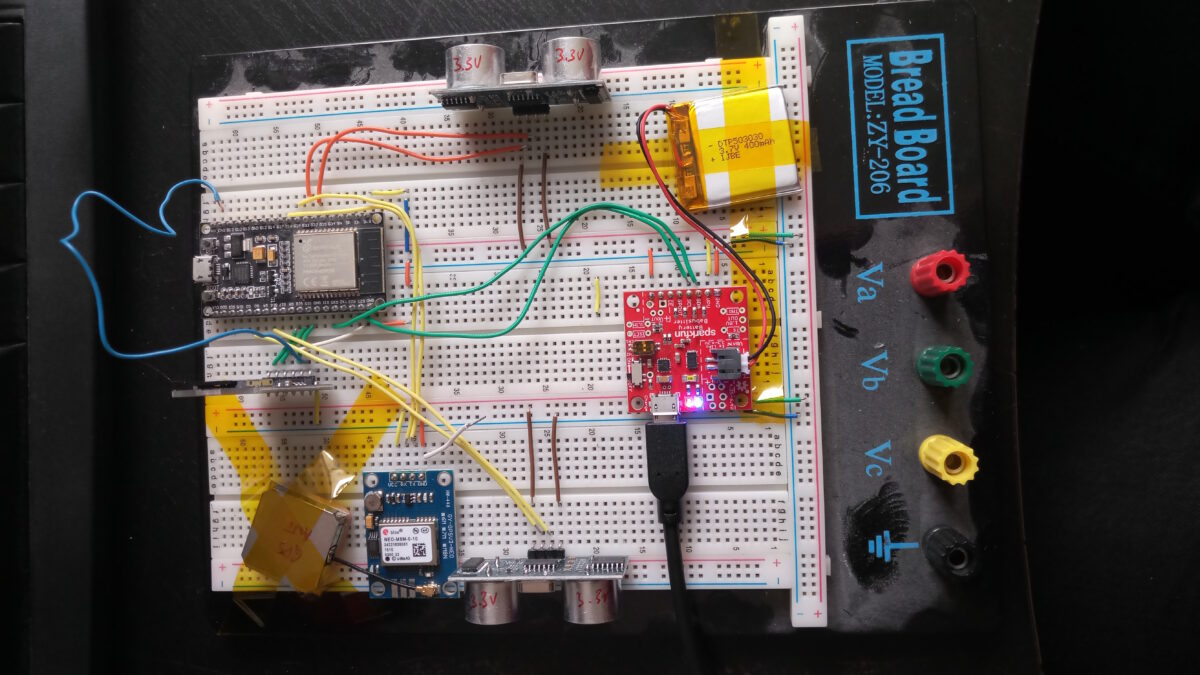
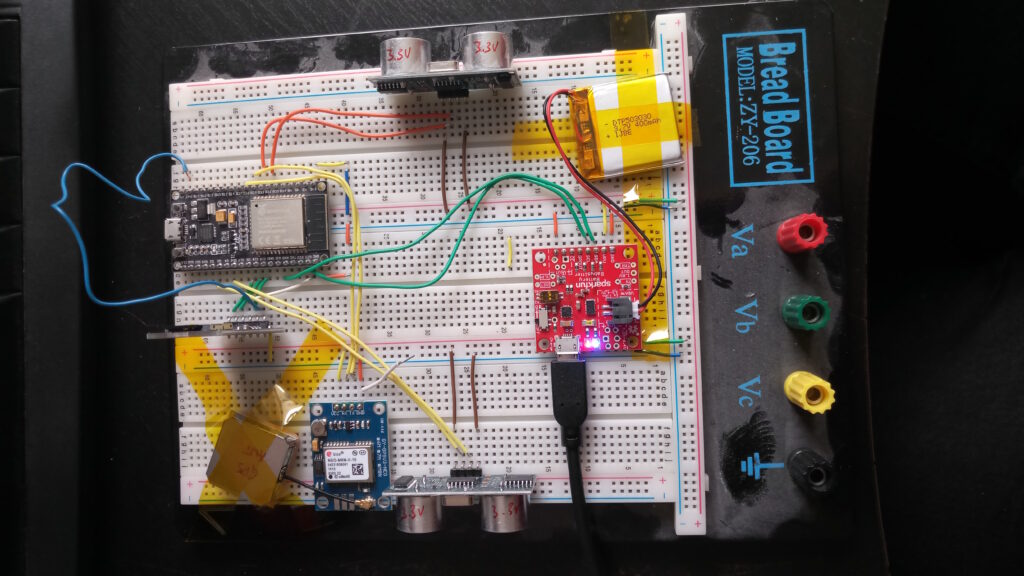
Breadboard with connected breakouts: ESP32 NodeMCU, microSC card slot, NEO-M8M GPS module with antenna, Sparkfun battery babysitter with battery and two 3.3V capable HC-SR04 ultrasonic range sensors

The annoyance by pavement and walkways blocked by parked cars has been rising again when I went back to parental leave with our second child. On the mere 900m from home to childcare, I was regularly blocked by parked cars despite the buggy only being 55cm wide.

The idea to measure and track the remaining width after motorists left their junk on/in my way grew already back in 2019. But there were always parts or time missing. Now finally, I am plugging together a little contraption that should be able to do what I want it to do: show and quantify how little space is left for pedestrians and how much of an obstacle this is to people who rely on small carts to help them move: parents, but also elderly with a walker or people in wheelchairs.

First things first: This is basically a remake of the famous OpenBikeSensor, which should – with a different firmware – totally work for this purpose, too. This is not about remaking the OBS. It’s rather a little write-up of what the process is about. And, of course, the proposal to use OBS or similar hardware to use for pavement width tracking (PWT, I guess I need a fancy three-letter shorthand 🤣).

The Sociopolitical Problem

For decades the city council of Darmstadt has simply tolerated parking on pavements. So much so that it is a very common sight in the city. This holds for many other German cities, too. But it causes trouble for pedestrians: You cannot walk next to each other, you can pass oncoming people only awkwardly (even more so during the pandemic), and finally if you’re trying to walk your baby to sleep or simply get somewhere with her or him, it’s close to scratching the sacred shiny finish of a car (Heil’ges Blechle) at best.
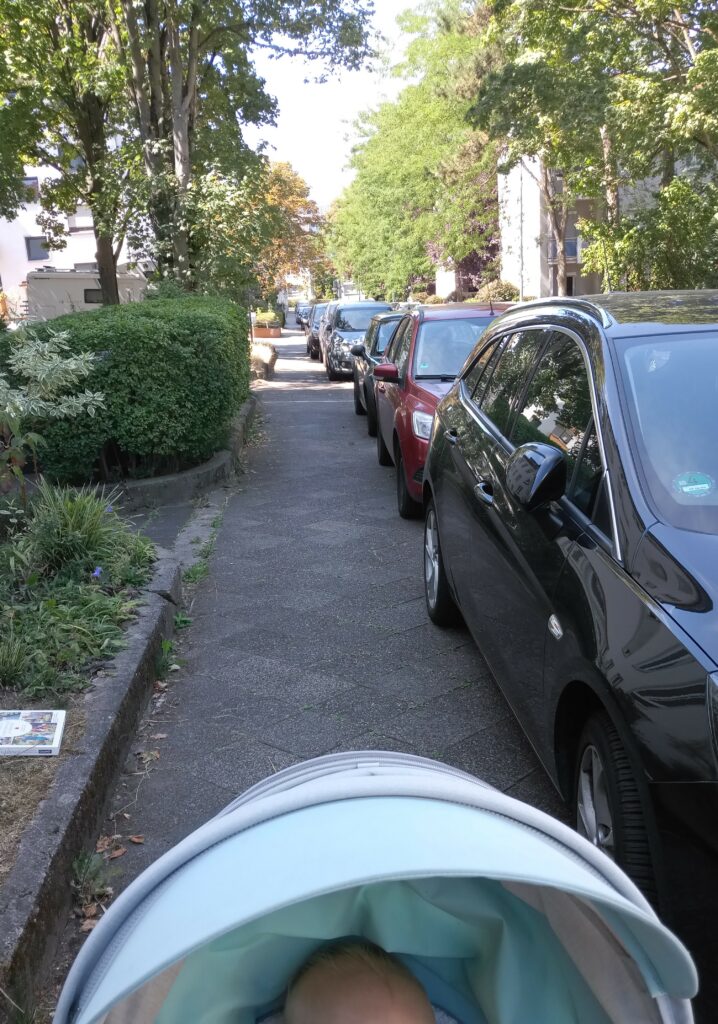
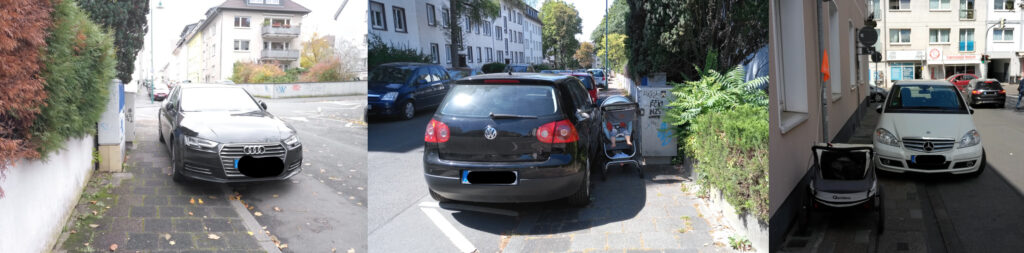
This is considered totally normal in Darmstadt: The pavement measures about 1.6-1.8 m but at least 50 cm of this width is occupied by wheeled sheet metal 23 hours a day. Such nicely cut green to the left is not the standard, by the way.
You shall not pass: mailboxes, electrical and utilities boxes, parking ticketing machines (ironically), e-scooters or mere idiots inapt of proper parking block the way.

While the latter is an obvious problem (you’re blocked and have to cross the street or walk there), reporting such cases is a nuisance: call the #Unordnungsamt and if you’re lucky and someone picks up, they may come days later and instead of removing the car just fine the holder (the blocking car on the left was left in place for three days, the one in the middle for at least eight days). You can also report the car to the authorities. If you do that more often and happen to live in Bavaria, you risk a fine based on (imho grossly abused) data protection legislation (often being 8 times in the particular case). And then there are reports of city councils not going after the offenders even if presented with full evidence (at least this cannot be said for Darmstadt).

But the first, the constant abuse of pavement for parking, is indeed a problem. We have two push vehicles for our kids: one is a buggy (55 cm wide), one is a two seated bike trailer that works as buggy too (85 cm wide). Those are not excessive widths. The latter is about 15 cm wider than a wheelchair – though bear in mind that you need your hands to move the wheels, so 90 cm is consider the minimum passage width.

The hypothesis I want to prove with the BabyRanger (or any modified OBS) is: A large part of the public space is being obstructed by parked cars because pavement parking is tolerated.

The Technical Problem

Measuring distances ain’t easy. Estimating the distance between two obstacles left and right in a straight line, ideally perpendicular to either (at least one of) the obstacles’ surfaces, the walking direction and/or the footpath path direction is a different story still.

Other problems I can think of: Deciding which side of the street you are on. Whether you are blocked and have to change sides or simply wanted to cross the street. How to detect if the sensors are misplaced. How to install the system on the various kinds of carts there are. And so on…

Mapping those data in a geographically meaningful way without disclosing the whereabouts and routes of the user of the system, and how to visualise the whole thing, is a yet another story.

What I’m Currently Doing

At the moment all I am struggling with is the GPS module. I chose NeoGPS as framework and it’s powerful, but pretty easy to get lost in. At the moment, UART is doing its thing, the logic analyser can read meaningful data at the chosen settings too, and NMEA sentences are transmitted.

However, they only fill the buffer but don’t produce any fixes let alone position data.

So: I’m in between tinkering a little more or switching to a different framework.

[Update 2022-10-15]

Well, the 3.3V SD card breakouts arrived yesterday, so let’s go for a walk. Roughly 20 minutes (i.e. ~1200 seconds) and guess what this beauty scribbled to flash drive:
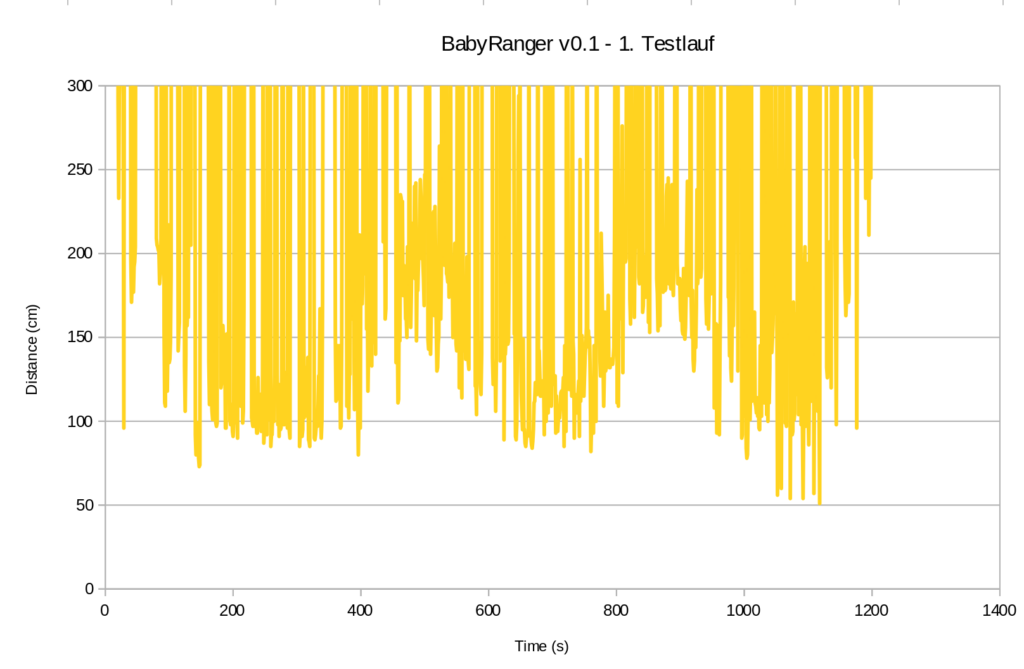
Measured distance between left and right walls during a 20 minutes walk with the BabyRanger v0.1. And yes, I hate myself too for plotting this in LibreOffice Calc.

So, even though I would say it’s been a very tidy situation on the pavements (judging from experience in the street I walked down), here we go: Below 100 cm almost half the time and towards the end down to 50 cm. To be taken with a huge pinch of salt though until stuff like alignment, stability, unexpected obstacles etc. are properly taken care of.

[End of Update 2022-10-15]

Invitation

While I will be able to devote only limited time on this, I invite anyone with an OBS to see what solution they could think of. And to contact me if you’re interested to work on this issue ☟
Categories
Linux

Xerox WorkCentre 3225 works with CUPS’ Xerox WorkCentre 7345 Driver

The heading is basically all. The WorkCentre 7345 driver supports lots of things that are not supported by the WorkCentre 3225 printer. However, and that’s why this is important:

It (7345) is available for ARM architectures, 3225 is not.

Why is this important? Because when you want to run a small SBC to make that printer Wifi capable in a non-annoying way, you cannot use the Xerox provided ARM driver as it does not support armhf, armv7l and the likes that you find on many SBCs, like the Raspberry Pi or the Tinkerboard it is running on now.

Categories
Rants

F*** you, Amazon!

Pardon my French on the title. You’ll see why, though.

Recently, my trusted Kindle 3’s display broke. That device is from around 2012 and served me very well. It was registered with my Amazon account and I do have a few e-books on that account.

Devices just “unregister”

Remarkable first discovery: The broken Kindle automagically un-registered and disappeared from my device list. Wtf?

This is remarkable, because apparently you cannot download your purchases if you have no Kindle device (or app) registered. I very much doubt that this is legal in the EU. Sure, you can install the Kindle app on a phone, tablet or (Windoze) PC or Mac. But that’s just chicanery.

But imagine for a moment what this means: You don’t buy a book (physical paper). You don’t even buy the license to read it at your own time and terms. You buy the right to view your book on an infrastructure that Amazon controls and in a way that Amazon dictates you. The moment your device drops out of support, you can conveniently buy a new device – at x Euro, producing completely unnecessary electronic waste. All this just to look at the books you paid money for already.

Devices are “obsolescensed” by not doing simple things (like OTP)

Remarkable second discovery: The firmware of the Kindle 3 (the one with the keyboard) was never re-touched to support one-time passwords (OTP) in a half-way user-friendly way.

I won’t go on about how bad security is at Amazon. I’ve had a colleague who got their account nicked and got pushed around by customer service like in a Kafka novel.

So, then I found this forum post which says: Type your password, wait for the SMS or App to send you the OTP (6-digit code) and then re-type your password with the OTP appended. Sounds fair to me, after all, that’s how OTP is implemented in many cases where there is no special user input other than the password field.

Except that it does not work. It works differently:

  • Register using your password
  • Wait for your OTP
  • Type only the OTP into the password field
  • Bob’s your uncle.

Note: This worked on a Kindle 3 Wifi+EDGE (EU) with firmware version 3.4.3.

Lesson Learned

The take-away lesson here: Don’t lock yourself into Amazon’s Kindle. It’s worse than Apple. At least there, you can download most purchases from iTunes (or whatever it’s called nowadays).

Make no mistake: DRM or whatever it is that Amazon does here, on e-books and music is basically bossing around customers.

I bought into this back in 2012. I did it with a bad feeling but it was the relatively best reader at a budget at the time. However, the problems I am describing are deliberate and they are created by Amazon to – I can only assume – keep selling readers and to lock-in customers.

Thanks for nothing, Bezos!

While posting the work-around to the amazon forum – using the term sucks – I was unable to post the comment. No error message. Upon removing the term sucks, I was allowed to post. Figure that.

Categories
Hardware Linux

Dell XPS 9310 (Evo) does run Ubuntu* 22.04 (Kernel 5.15)

Just a quick post today confirming that you can actually take a Dell XPS 13 9310 (Evo) shipped with Windoze 11, and run a vanilla Ubuntu 22.04 on it with all peripherals working and no fuzz (well, some, if you do it the way I did).

I basically took my SSD from my old Dell XPS 13 9350 (yes, 9310 is much newer than 9350 – hardware manufacturers move in mysterious ways) and plucked it into the new 9310. This booted up with no issues and I thought I was good to go. Until, that is, I realised that my Wifi was indeed not working.

The problem was solved, when I removed older firmware files out of /lib/firmware, and got the newest (version 73, as of today) from the kernel archive. Admittedly, this step was not necessary, as I later found out that virtually every version from 55 upwards should be working. But who cares.

So, what you want to have in your /lib/firmware directory is this:

user@laptop:~$ uname -r
5.15.0-43-generic

user@laptop:~$ lsb_release -a
No LSB modules are available.
Distributor ID:	Ubuntu
Description:	Ubuntu 22.04.1 LTS
Release:	22.04
Codename:	jammy

user@laptop:~$ ls /lib/firmware/iwlwifi-QuZ*
/lib/firmware/iwlwifi-QuZ-a0-hr-b0-55.ucode
...
/lib/firmware/iwlwifi-QuZ-a0-jf-b0-73.ucode

And your new, used Dell XPS 13 9310 which came with anoying Windoze 11 now works like a charm with Ubuntu 22.04.

*) By the way: This should be completely distribution-agnostic, since it’s really only the Kernel and the AX201 Wifi adapter firmware version that counts. Docs say from Kernel 5.8 onwards iwlwifi‘s support for AX201 left experimental state and should therefore work. It may show more hiccups with older versions concerning e.g. sleep states, though.

Categories
Docker FPGA Linux

Running Xilinx ISE 14.7 in Docker

In an earlier post, I wanted to get Xilinx ISE 14.7 to run on an up-to-date Ubuntu 22.04 LTS which failed miserably.

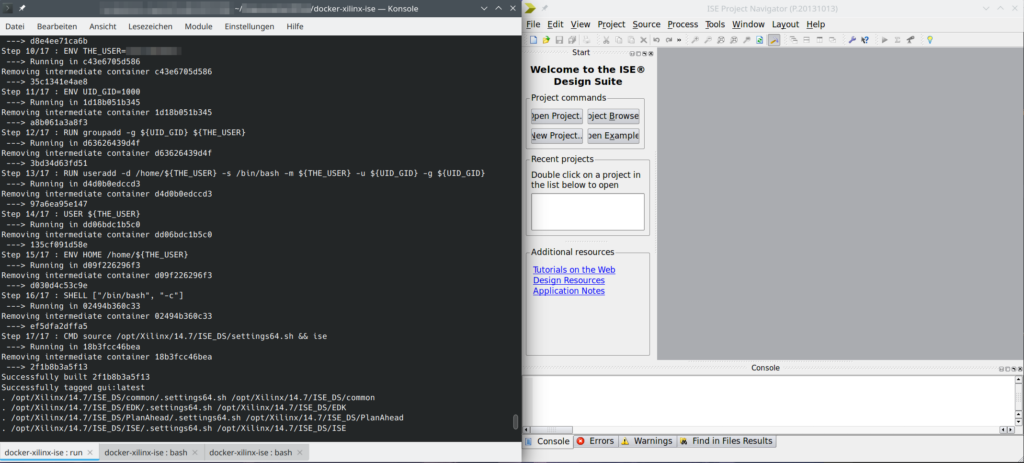
So, instead I chose the container route using Docker. This seems to work quite well, so I’d like to share it with anyone interested.

I’ve packed a working setup in a Gitlab repository.

ISE 14.7 running in a Docker container (guest: Ubuntu 14.04, host: Ubuntu 22.04)

This is still work-in-progress, as I have not tackled the license, yet.

Update 2022-07-15: I’ve added gcc to the installed packages to allow ISim to actually do something useful. The issue with Firefox (opening online documentation) seems to stem from the fact that Firefox is built against glibc++ 3.4.9-11, but ISE ships a libstdc++6 file which provides only up to 3.4.8. When sourcing the settings64.sh script, the libraries are messed with and only the shipped libstdc++6 is available.

Categories
Uncategorized

Got a R&S FSH4 and want to extract screenshots?

Situation: I’ve taken about 50ish measurements on an FSH4 spectrum analyser saving a dataset of each using the save data function of the spectrum analyser.

Turns out: The R&S InstrumentView application does not install on Wine. So, how do I get the screenshots embedded in the saved datasets? Right: Search for the PNG magic number and a chunk end.

This is really sketchy but worked on all measurement files. If you’re in the same situation, just check out my repository.

https://gitlab.com/cweickhmann/extract-png-from-rs-set

Note: No affiliation with R&S whatsoever. Please don’t pester them if the script is not working.

Categories
Engineering FPGA Hardware Linux

Xilinx ISE 14.7 and SDK on Ubuntu 22.04

As discussed in [Insanity4004]’s excellent blog post, Xilinx packages their ISE and SDK suite with the necessary libraries (like Qt4 for example). Unfortunately, some seem to be missing and cause errors that are rather cryptic for the lay(wo)man.

In addition to providing libpng and libfreetype, I’ve noticed that in order to start the SDK (xsdk, part of the EDK package), you need to provide an older version of libcairo as well.

With the standard installation, starting xsdk results in:

[...]/EDK/bin/lin64 $ ./xsdk

  Xilinx Software Development Kit
  Xilinx EDK 14.7 Build EDK_P.20131013
  Copyright (c) 1995-2012 Xilinx, Inc.  All rights reserved.
  Eclipse:
  An error has occurred. See the log file
  [...]/.eclipse/com.xilinx.sdk.product_1.0.0_1005998729/configuration/1655967348948.log.

[...]/EDK/bin/lin64 $ cat [...]/.eclipse/com.xilinx.sdk.product_1.0.0_1005998729/configuration/1655967348948.log

  !SESSION 2022-06-23 08:55:48.743 -----------------------------------------------
  eclipse.buildId=Release 14.7 Build SDK_P.20131013
  java.version=1.6.0_21
  java.vendor=Sun Microsystems Inc.
  BootLoader constants: OS=linux, ARCH=x86_64, WS=gtk, NL=de_DE
  Command-line arguments:  -os linux -ws gtk -arch x86_64
  
  !ENTRY org.eclipse.osgi 4 0 2022-mm-dd hh:mm:ss.605
  !MESSAGE Application error
  !STACK 1
  java.lang.UnsatisfiedLinkError: Could not load SWT library. Reasons: 
          [...]/.eclipse/com.xilinx.sdk.product_1.0.0_1005998729/configuration/org.eclipse.osgi/bundles/243/1/.cp/libswt-pi-gtk-3836.so: /lib/x86_64-linux-gnu/libcairo.so.2: undefined symbol: FT_Get_Var_Design_Coordinates
          no swt-pi-gtk in java.library.path
          Can't load library: [...]/.swt/lib/linux/x86_64/libswt-pi-gtk-3836.so
          Can't load library: [...]/.swt/lib/linux/x86_64/libswt-pi-gtk.so
          [...]/.swt/lib/linux/x86_64/libswt-pi-gtk-3836.so: /lib/x86_64-linux-gnu/libcairo.so.2: undefined symbol: FT_Get_Var_Design_Coordinates
  
          at org.eclipse.swt.internal.Library.loadLibrary(Library.java:331)
          at org.eclipse.swt.internal.Library.loadLibrary(Library.java:240)
          at org.eclipse.swt.internal.gtk.OS.<clinit>(OS.java:22)
          at org.eclipse.swt.internal.Converter.wcsToMbcs(Converter.java:63)
          at org.eclipse.swt.internal.Converter.wcsToMbcs(Converter.java:54)
          at org.eclipse.swt.widgets.Display.<clinit>(Display.java:133)
          at org.eclipse.ui.internal.Workbench.createDisplay(Workbench.java:695)
          at org.eclipse.ui.PlatformUI.createDisplay(PlatformUI.java:161)
          at org.eclipse.ui.internal.ide.application.IDEApplication.createDisplay(IDEApplication.java:154)
          at org.eclipse.ui.internal.ide.application.IDEApplication.start(IDEApplication.java:96)
          at org.eclipse.equinox.internal.app.EclipseAppHandle.run(EclipseAppHandle.java:196)
          at org.eclipse.core.runtime.internal.adaptor.EclipseAppLauncher.runApplication(EclipseAppLauncher.java:110)
          at org.eclipse.core.runtime.internal.adaptor.EclipseAppLauncher.start(EclipseAppLauncher.java:79)
          at org.eclipse.core.runtime.adaptor.EclipseStarter.run(EclipseStarter.java:353)
          at org.eclipse.core.runtime.adaptor.EclipseStarter.run(EclipseStarter.java:180)
          at sun.reflect.NativeMethodAccessorImpl.invoke0(Native Method)
          at sun.reflect.NativeMethodAccessorImpl.invoke(Unknown Source)
          at sun.reflect.DelegatingMethodAccessorImpl.invoke(Unknown Source)
          at java.lang.reflect.Method.invoke(Unknown Source)
          at org.eclipse.equinox.launcher.Main.invokeFramework(Main.java:629)
          at org.eclipse.equinox.launcher.Main.basicRun(Main.java:584)
          at org.eclipse.equinox.launcher.Main.run(Main.java:1438)
          at org.eclipse.equinox.launcher.Main.main(Main.java:1414)

The reason is not too hard to find, but the error message is a mouthfull. The important bit is

java.lang.UnsatisfiedLinkError: Could not load SWT library. Reasons: 
 [...]
/lib/x86_64-linux-gnu/libcairo.so.2: undefined symbol: FT_Get_Var_Design_Coordinates

Which basically means: I am looking for libcairo, found it on your system, but the symbol (call, function, whatever) named FT_Get_Var_Design_Coordinates does not exist there.

I have not investigated the reasons for this further. I assume, this function got renamed, moved, dropped since 2013. So I followed the recipe proposed in the blog post mentioned in the beginning:

  • Get the Ubuntu 16.04 deb-file of libcairo (e.g. by searching for “ubuntu 16.04 libcairo” in your favourite search engine)
  • Open it, and open the data.xz file within.
  • Extract the file libcairo.so.2.11400.6
  • Rename it to libcairo.so.2
  • Move it to your [...]/EDK/lib/lin64 folder. In my case this is /opt/Xilinx/14.7/ISE_DS/EDK/lib/lin64.

I fear I might run into these issues again and again since we’re stuck here with a Virtex-6 device. I wonder if SymbiFlow F4PGA are working on a 6-series toolchain. That’d certainly create some resilience against the future.

Small side note I: The 6-series system here is supposed to replace an analogue RF control system that was in service for 30-something years. People were reluctant to switch to digital because of fears of this (what you see above): Toolchains being very complex and not working anymore after only a couple of years, vendors dropping support (well, Xilinx technically did not drop it entirely, but they’ve certainly not fixed library dependencies or checked that they ship their programmes with the old versions).

Small side note II: The fact that I can just (1) go to a trusted repository of old packages (Ubuntu’s Launchpad), (2) grab a package file, (3) extract an old shared library file, and (4) drop it in place without breaking my whole system, is a pretty awesome feature of Linux systems. I know for a fact that other platforms (yeah, looking towards the Seattle area) struggle with steps 1 and 4.

Post scriptum I: Trying to start xilhelp revealed three more libraries missing. libXp.so.6 (get it here), libXm.so.4 (run apt install libxm4) and libstdc++5 (you’ll have to go back to Ubuntu 14.04 Trusty for that). But ended in a SEGFAULT *sigh*.

Post scriptum II: Way more is broken than I had estimated! All Tcl-based scripts (that is: all IP Core generators) need libtcl8.4, obviously, duh! So, well get libtcl8.4.so from Ubuntu 16.04. At least, now the license wizard is opening up. But that causes all sorts of other problems with Tcl. I suppose it’s because no packages are installed in any way. Let’s say: ISE 14.7 is severely broken on newer systems. Way out 1: A VM with Ubuntu 14.04 or 16.04 (yikes!). Way out 2: F4PGA, maybe!?

Categories
SymPy

Quick Transfer Functions with SymPy

SymPy allows quick and (relatively 😜) easy manipulation of algebraic expressions. But it can do so much more! Using the sympy.physics.control toolbox, you can very inspect linear time-invariant systems in a very comfortable way.

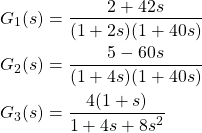
I was looking at a paper (Janiszowski, 1993) which features three transfer functions of different properties and wanted to look at their pole-zero diagrams as well as their Bode plots in real frequency. The transfer functions where the following:

(1)    \begin{align*} G_1(s) &= \frac{ 2 + 42s }{ (1 + 2s)(1 + 40s) } \\ G_2(s) &= \frac{ 5 - 60s }{ (1 + 4s)(1 + 40s) } \\ G_3(s) &= \frac{ 4(1 + s) }{ 1 + 4s + 8s^2 } \end{align*}

Drawing the pole-zero diagrams from this representation is easy:

  • Zeros: Set numerator to zero
  • Poles: Set denominator (or its individual terms) to zero

Drawing the Bode diagram however would’ve involved some basic programming. But neither is necessary.

import sympy as sy
from sympy.physics.control.lti import TransferFunction as TF
from sympy.physics.control import bode_plot, pole_zero_plot

s = sy.symbols("s", complex=True)

G1 = (2 + 42*s)/((1 + 2*s)*(1 + 40*s))
tf = TF(*G.as_numer_denom(), s)
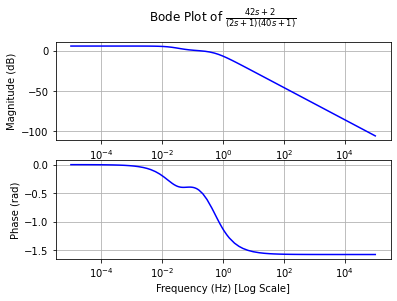
bode_plot(tf)
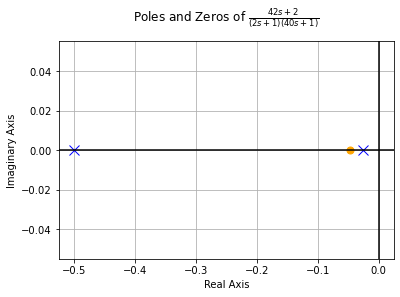
pole_zero_plot(tf)
Bode plot of the transfer function G1(s)
Pole-Zero diagram of the transfer function G1(s)

Well, that was easy. TransferFunction (abbreviated with TF in my examples) requires numerator and denominator to be passed as separate arguments. sympy_expr.as_numer_denom() is convenient, as it returns a (numerator, denominator) tuple. Using the asterisk expands this.

Now, what else can we do with this? Look at RLC resonators, for example:

A parallel resonator of resistance R, inductance L and capacitance C

The reactance of the inductor and capacitor are given by

(2)    \begin{equation*} X_C = \frac{1}{sC} \quad \text{and} \quad X_L = sL \end{equation*}

where s is basically the complex frequency (we’re looking at this with Laplace eyes). Now, off to SymPy we go:

R, C, L = sy.symbols("R, C, L", real=True, positive=True)
Xc, Xl = 1/(s*C), s*L

def par(a, b):
    # Shorthand for a parallel circuit
    return a*b/(a+b)

G = par(Xc, par(R, Xl)).ratsimp()
G = G.subs({R: 1e3, L: 1e-6, C: 1e-6})
tf = TF(*G.as_numer_denom(), s)
bode_plot(tf, 5, 7)
pole_zero_plot(tf)

For visualisation we choose R = 1 kΩ, L = 1 µH and C = 1 µF.

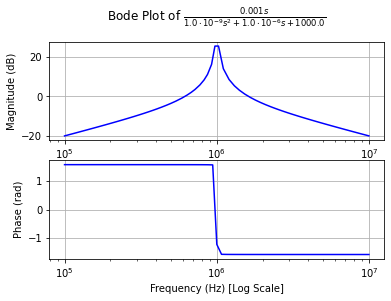
Bode plot of the parallel RLC circuit with R = 1 kΩ, L = 1 µH and C = 1 µF, and hence a resonance frequency of 1 MHz
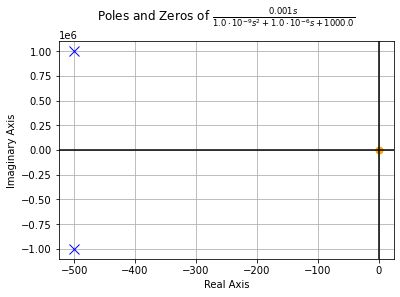
And its pole-zero plot just for the lolz.

Why is this useful? Well, because it is quick and robust and once you have your transfer function typed out, you get the impulse and step responses for free:

import sympy as sy
from sympy.physics.control import impulse_response_plot
from sympy.physics.control import step_response_plot

s = sy.symbols("s", complex=True)
G1 = (2+42*s)/((1+2*s)*(1+40*s))
G2 = (5-60*s)/((1+4*s)*(1+40*s))
G3 = 4*(1+s)/(1+4*s+8*s**2)

for G in [G1, G2, G3]:
    tf = TF(*G.as_numer_denom(), s)
    bode_plot(tf)
    pole_zero_plot(tf)
    step_response_plot(tf, upper_limit=60)
    impulse_response_plot(tf, upper_limit=60)

Note: SymPy’s adaptive plotting is not particularly good at plotting oscillations, so the impulse response of the RLC circuit above will look ugly.

Categories
Linux Uncategorized

Lost Gitea Local Admin Password?

There are various possible ways you can lose access to your Gitea instance. In particular, if you are getting user accounts via LDAP, you should always have a key to get back in: a “local” admin.

In case you haven’t got one (totally not like I did definitely only once 🤫), deleted it or lost its password, here’s the procedure in to variants: running on plain Linux, and running within Docker.

Plain Linux

List the available (local) user accounts (you may need to run this with sudo):

$ gitea admin user list

ID   Username     Email             IsActive IsAdmin
1    user1        me@home.earth     true     false

You may not get a single user listed here. In order to add a local administrator, do this

$ sudo gitea admin user create --username local_admin --email admins@email.earth --admin --random-password

generated random password is 'IzgvOwv1M9EG'
New user 'local_admin' has been successfully created!

$ sudo gitea admin user list

ID   Username     Email                 IsActive IsAdmin
1    unpriv_local bowfingermail@gmx.net true     true
3    local_admin  admins@email.earth    true     true

Especially on shared machines, I’d strongly recommend not setting a password via the command line. It’ll stick in bash_history and may be visible in the process list. Hence the --random-password option here. Use the generated password upon first login in the browser.

Docker Container

In order to get to the “plain Linux” field, you simply run a bash in the Gitea Docker container.

What’s the container’s name? Get it via docker container ls -a. Let’s say it’s called gitea. To start bash in that container, do

user1@linux:$ docker exec -it gitea /bin/bash

Now, you basically do the same thing as in the section above.

docker # gitea admin user list

ID   Username     Email             IsActive IsAdmin
1    user1        me@home.earth     true     false

docker # gitea admin user create --username local_admin --email admins@email.earth --admin --random-password

generated random password is 'ikV6xzPTiH7B'
New user 'local_admin' has been successfully created!

docker # gitea admin user list

ID   Username     Email                 IsActive IsAdmin
1    unpriv_local bowfingermail@gmx.net true     true
3    local_admin  admins@email.earth    true     true

Conclusion (and Other Platforms)

The Plain Linux approach works equally well on other platforms. I hope this helps.

Categories
Uncategorized

Numbers games: Z-Transform and some sympy

Back in uni me and control systems never really clicked. So I took a dive into the topic as I had the time. Long story short for all who know equally little or even less about the maths of control systems as I do:

  • Often, you model control systems using the Laplace transform. That’s nice and good for continuous systems.
  • Once you’re going to the discrete (digital) world, you want to use the Z-transform.
  • There is a (complicated) relation between Laplace domain and Z domain.
  • There are approximations, using a complex maps to map from Laplace to Z domain (a bilinear transformation, Tustin’s method, being the one used here).

This is a post on serendipity, because what this is about is actually neither control systems, Z-, or Laplace transforms but a numbers game. Bare with me.

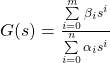
Many systems can be modelled using a rational function of the form

 G(s) = \frac{\sum\limits_{i=0}^m \beta_i s^i}{\sum\limits_{i=0}^n \alpha_i s^i} \qquad\text{\alpha_0 = 1}

You can easily put this into sympy and play around with it.

import sympy as sy

s, z, Ts = sy.symbols("s, z, T_s")

a0 = sy.S.One
a1, a2 = sy.symbols("alpha_1, alpha_2")
b0, b1, b2 = sy.symbols("beta_0, beta_1, beta_2")

G = (b0 * s**2 + b1 * s + b2) / (a0 * s**2 + a1 * s + a2)
G # use `print(sy.latex(G))` to get the LaTeX representation

 \frac{\beta_{0} s^{2} + \beta_{1} s + \beta_{2}}{\alpha_{1} s + \alpha_{2} + s^{2}}

Nice. Let’s generalise this a little bit:

import sympy as sy

s, z, Ts = sy.symbols("s, z, T_s")

N, M = 2, 2

a = sy.symbols(f"alpha_1:{N+1}")
a = (sy.S.One, *a)
b = sy.symbols(f"beta_0:{M+1}")

G = sy.Add(*[b[i] * s**i for i in range(M+1)]) / sy.Add(*[a[i] * s**i for i in range(N+1)])

By playing with the values for N and M we can now generate any order of rational function we wish. Again, not the thing this article is about.

Then there is the bilinear transform called Tustin’s method that approximately maps the function G from the Laplace domain into the Z domain.

 s \Rightarrow \frac{2}{T_s} \frac{z-1}{z+1}

Let’s do this in sympy:

tustin = 2/Ts * (z-1)/(z+1)

G.subs({s: tustin}).simplify()

 \frac{T_{s}^{2} \beta_{0} \left(z + 1\right)^{2} + 2 T_{s} \beta_{1} \left(z - 1\right) \left(z + 1\right) + 4 \beta_{2} \left(z - 1\right)^{2}}{T_{s}^{2} \left(z + 1\right)^{2} + 2 T_{s} \alpha_{1} \left(z - 1\right) \left(z + 1\right) + 4 \alpha_{2} \left(z - 1\right)^{2}}

Sweet. Now, I want to have the representation in two polynomials in z (numerator and denominator) to extract the coefficients (because that’s what I wanted to hack into code):

num, den = G.as_numer_denom()
num = sy.Poly(num, z)
den = sy.Poly(den, z)

num.coeffs()
den.coeffs()

This gives you a nice, codeable result:

num: [  T_s**2*beta_0 + 2*T_s*beta_1  + 4*beta_2,
      2*T_s**2*beta_0                 - 8*beta_2,
        T_s**2*beta_0 - 2*T_s*beta_1  + 4*beta_2]
den: [  T_s**2        + 2*T_s*alpha_1 + 4*alpha_2,
      2*T_s**2                        - 8*alpha_2,
        T_s**2        - 2*T_s*alpha_1 + 4*alpha_2]

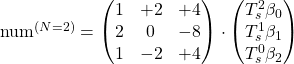
… but my eye spotted a pattern here. Do you see it? It’s easier to see in matrix representation, and I’ll only look at num (i.e. the expression with βi in it, because I set É‘0 to 1):

 \text{num}^{(N=2)} = \begin{pmatrix}                                 1 & +2 & +4 \\                                 2 & 0 & -8 \\                                 1 & -2 & +4                          \end{pmatrix} \cdot \begin{pmatrix}                                                                    T_s^2 \beta_0 \\                                                                    T_s^1 \beta_1 \\                                                                    T_s^0 \beta_2                                                                \end{pmatrix}

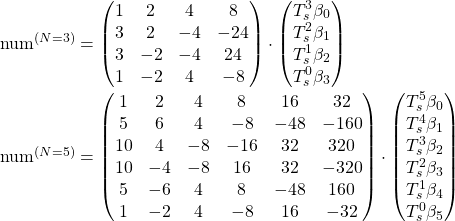
Here is the resulting matrix for N = M = 3 and for N = M = 5:

 \text{num}^{(N=3)} = \begin{pmatrix}                                 1    & 2    & 4    & 8    \\                                 3    & 2    & -4   & -24  \\                                 3    & -2   & -4   & 24   \\                                 1    & -2   & 4    & -8   \\                          \end{pmatrix} \cdot \begin{pmatrix}                                                                    T_s^3 \beta_0 \\                                                                    T_s^2 \beta_1 \\                                                                    T_s^1 \beta_2 \\                                                                    T_s^0 \beta_3                                                                \end{pmatrix} \\  \text{num}^{(N=5)} = \begin{pmatrix}                                 1    & 2    & 4    & 8    & 16   & 32   \\                                 5    & 6    & 4    & -8   & -48  & -160 \\                                 10   & 4    & -8   & -16  & 32   & 320  \\                                 10   & -4   & -8   & 16   & 32   & -320 \\                                 5    & -6   & 4    & 8    & -48  & 160  \\                                 1    & -2   & 4    & -8   & 16   & -32                          \end{pmatrix} \cdot \begin{pmatrix}                                                                    T_s^5 \beta_0 \\                                                                    T_s^4 \beta_1 \\                                                                    T_s^3 \beta_2 \\                                                                    T_s^2 \beta_3 \\                                                                    T_s^1 \beta_4 \\                                                                    T_s^0 \beta_5                                                                \end{pmatrix}

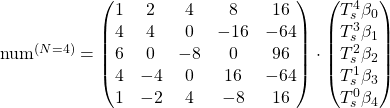
Here are the resulting matrices for N = M = 4:

 \text{num}^{(N=4)} = \begin{pmatrix}                                 1    & 2    & 4    & 8    & 16   \\                                 4    & 4    & 0    & -16  & -64  \\                                 6    & 0    & -8   & 0    & 96   \\                                 4    & -4   & 0    & 16   & -64  \\                                 1    & -2   & 4    & -8   & 16                          \end{pmatrix} \cdot \begin{pmatrix}                                                                    T_s^4 \beta_0 \\                                                                    T_s^3 \beta_1 \\                                                                    T_s^2 \beta_2 \\                                                                    T_s^1 \beta_3 \\                                                                    T_s^0 \beta_4                                                                \end{pmatrix}

Here are the resulting matrices for N = M = 6

 \text{num}^{(N=6)} = \begin{pmatrix}                                 1    & 2    & 4    & 8    & 16   & 32   & 64   \\                                 6    & 8    & 8    & 0    & -32  & -128 & -384 \\                                 15   & 10   & -4   & -24  & -16  & 160  & 960  \\                                 20   & 0    & -16  & 0    & 64   & 0    & -1280 \\                                 15   & -10  & -4   & 24   & -16  & -160 & 960  \\                                 6    & -8   & 8    & 0    & -32  & 128  & -384 \\                                 1    & -2   & 4    & -8   & 16   & -32  & 64                           \end{pmatrix} \cdot \begin{pmatrix}                                                                    T_s^6 \beta_0 \\                                                                    T_s^5 \beta_1 \\                                                                    T_s^4 \beta_2 \\                                                                    T_s^3 \beta_3 \\                                                                    T_s^2 \beta_4 \\                                                                    T_s^1 \beta_5 \\                                                                    T_s^0 \beta_6                                                                \end{pmatrix}

The odd values for N and M produce matrices with all non-zero values, so I’ll look at those first.

What I find stunning is the fact that there are so many patterns and yet I fail to think of a pattern that creates the whole matrix. For example, the first column clearly follows the binomial distribution:

\begin{pmatrix}N \\ k\end{pmatrix}

where k is the row number starting with 0.

The first and last rows of the matrix are power series of 2 and -2 respectively:

 2^l \quad \text{and} \quad (-2)^l

where l is the column number starting at 0.

Every column has a different sign pattern starting at all positive on column 0 and alternating, starting with + on the last column.

Ignoring the signs, the columns are related like this

N#0 ↷ #N-1#1 ↷ #N-2#2 ↷ #N-3#3 ↷ #N-4
3྾ 8྾ 2
5྾ 32྾ 8྾ 2
7྾ 128྾ 32྾ 8྾ 2
What multiples relate the lth column from the left with the lth column from the right, ignoring the sign.

Maybe this follows from the power series mentioned earlier. But looking at the coefficients in each column the binomial pattern is lost as you move to the inside.

And last but not least wild zeros appear when you look at the even values for N and M:

Apparently, in the middle row as well as the middle column, every other value is zero.

All right, I’m absolutely sure mathematicians and control systems theoreticians have looked at this back in the day and this is all solved and done. Still, I found it interesting to look at.

If you want to create those values yourself, you can use this little script, and modify N and M. But beware, at N = 10 the script runs for 10 seconds.

import sympy as sy

s, z, Ts = sy.symbols("s, z, T_s")

N, M = 3, 3  # <-- Modify here

a = sy.symbols(f"alpha_1:{N+1}")
a = (sy.S.One, *a)
b = sy.symbols(f"beta_0:{M+1}")

G = sy.Add(*[b[i] * s**i for i in range(M+1)]) / sy.Add(*[a[i] * s**i for i in range(N+1)])

tustin = 2/Ts * (z-1)/(z+1)
G = G.subs({s: tustin}).simplify()

num, den = G.as_numer_denom()
num = sy.Poly(num, z)
den = sy.Poly(den, z)

for l in num.coeffs():
    p = sy.Poly(l, Ts)
    for i, B in enumerate(p.all_coeffs()):
        try:
            coeff, _ = B.as_two_terms()
        except:
            coeff = 0 if B is sy.S.Zero else 1
        print(f"{repr(coeff):6s} & ", end="")
    print()

Oh, and of course you can change N and M independently from each other, but I could not be bothered to look at this as well.